Changelog
Unreleased
Adrenaline
- Add support to use files on
ux0:data/PSPEMUCFW/instead ofux0:app/PSPEMUCFW/ - Fix savestate thumbnail on some graphical filters showing as one color plain image
- Fix UTF-8 rendering on Adrenaline Menu
Epinephrine CFW
-
Add option to select PSP game plugin loading behavior [docs]
-
Add option to forcibly disable high memory layout [docs]
-
Fix branch logic for plugins patch
-
Fix formatting issues on recovery
-
Refactor SystemControl and Pentazemin modules to use
sctrlHENSetSystemBootedHandler -
DEV: Introduce
sctrlHENSetSystemBootedHandler- It allows to se a handler that is called only once when the system just finished the boot sequence.
-
DEV: Expand
isoCtrl_driverAPI withisoGetUmdFile,isoReopenUmdFile,isoSwapUmdFile. -
DEV: Introduce
NoDrmHelperCFW library- Although used internally for Epinephrine NoDRM engine, this could also be used to help implement plugins that closes eventual gaps in the NoDRM engine or even a external full implementation of a NoDRM engine.
v8.0.2
Adrenaline
- Fix the PS1 overlay image not processing correctly
Epinephrine CFW
- Fix
Saved Data Utilitynot opening withSystem Storageset to disabled. - Fix XMB Memory Stick item showing zero free space after accessing
Saved Data Utility - Fix plugins failing to load on POPS (PS1 titles)
- Fix crash in opening context menu when
XMB CFW Settingsis disabled - Fix Uncategorized category on Categories Lite showing corrupt icons
- Refactor: Don’t try to load userlevel plugins on extra RAM on POPS
- Refactor: Make fake
TotalFreeMemmore precise - DEV: Fix
gugluelibrary not exported with weak reference support
Updater
- Feature: Upgrade the design of the updater
v8.0.1
Epinephrine CFW
- Fixed
Categories Litenot able to find the categorized ISO files
v8.0.0
Adrenaline
- Add option to select the vPSP Custom Firmware to use [docs]
- Add
Scale2xgraphical filter options [docs] - Add
Scale2x Plusgraphical filter options [docs] - Add
Scale3xgraphical filter options [docs] - Add image overlay filter for PS1 game/apps [docs]
- Add an option to select a System Storage location to expose
ef0:to the chosen CFW. - “Fix” manual double launch on first install
- Improve frame pacing on Original graphics filtering
- Implement hold
Squareto hide Adrenaline Menu on graphics-related settings - Pauses PSP game when Adrenaline Menu is opened
- Implement the ability to hide the Adrenaline Menu to better look at the screen for differences
Epinephrine CFW
-
Breaking change: New plugin configuration format [docs]
- Only one configuration file
/pspemu/seplugins/plugins.txtfor all runlevels - Finer control over when to enable/disable plugins
- Support for plugins in specific games
- Support for plugin only on homebrew apps
- Migration instructions below
- Only one configuration file
-
Update the Inferno Driver to Inferno 2 [docs]
-
Introduce March33 Driver v2: An evolution of the March33 ISO driver [docs]
-
Introduce MinimalEdition Driver v2: An evolution of the ME ISO driver [docs]
-
Introduce an improved implementation of the GalaxyController [docs]
-
Add support for launching
JSO,ZSO,CSOv2, andDAXcompressed ISO formats using any ISO driver. [docs] -
Add support for per-file descriptor UMD seek/read speed emulation to ISO drivers.
-
Implement a GPU-rendered VSH Menu
- The classical version is still available through configuration
-
Add CFW file hider in games.
-
Introduce CFW Settings on the XMB [docs]
-
Introduce Plugin Manager on the XMB [docs]
-
Add support to show the
System Storageon the XMB. -
Improve stability of the
Force High MemoryCFW option. [docs] -
Improve the speed and efficiency of all UMDemu ISO drivers [docs]
-
Add Custom POPS Configuration injection for custom or converted PS1 game/apps [docs]
-
Patch libcrypt for custom or converted PS1 game/apps [docs]
-
Add
Memory Stick Cacheto speedup I/O operations in the Memory Stick drive (ms0) [docs] -
Add
Use Graphic Engine 2andUse Media Engine 2advanced CFW options [docs] -
Add
Fake max free memoryadvanced CFW option [docs] -
Add
Hide CFW files in PSP gamesgeneral CFW option [docs] -
Add
TTY redirectionadvanced CFW option [docs] -
Add support to show app version on XMB info for ISO games
- Support to show the correct version with game updates (
PBOOT.PBP)
- Support to show the correct version with game updates (
-
Implement “Hold L while launching apps” to not load plugins [docs]
-
Implement “Hold R while launching ISO apps/games” to execute
BOOT.BINinstead ofEBOOT.BIN[docs] -
Implement PSP native music player and
SenseMeto continue to play music after system suspend -
Add quick exit to VSH key combos [docs]
- PSP games/homebrew:
L+R+Down+SelectorL+R+Down+Start - PS1 games:
L2+R2+Down+SelectorL2+R2+Down+Start
- PSP games/homebrew:
-
Fix recovery menu crashing on empty plugin list when d-pad is clicked.
-
Fix module privilege level reset on official apps wrongly and set it to the user privilege level on homebrews
- Fix
SenseMelaunch error - Fix potential issues related to privilege level for other official apps
- Fix homebrew software not able to call some
sceKernelLoadModule*functions that they should be able to use
- Fix
-
Game Compatibility:
- Fix PBP collection games (e.g.
Ys I&II,Sega Genesis Collection) crashing after game selection - Fix
BEATScustom tracks - Fix the infinite loading screen on
Jackass: The Game - Fix
The Simpsons Gamecrashing during the start of the game - Fix
TwinBee Portablecrashing when not using English or Japanese language - Fix
Smakdown vs RAW 2009by bypassing anti-CFW check - Fix
Smakdown vs RAW 2010by bypassing anti-CFW check - Fix
Smakdown vs RAW 2011by bypassing anti-CFW check - Fix
Aces of Warby bypassing anti-CFW check - Fix
Pangya Fantasy Golfby bypassing anti-CFW check - Fix freeze on
Bust-A-Moveby bypassing anti-CFW check - Fix
Lego Star Wars IIWLAN switch state wrongly returning “off” - Fix
Megpoid the Music#audio and synchronization issues when run as ISO/CISO - Patch to remove the “overclocked” message on
ATV Pro - Fix
Rainbow Six: Vegasinstabilities with high memory layout options - Fix
Assassin's Creed: Bloodlinesinstabilities with Stable high memory layout - Fix
PaRappa The Rapperinstabilities with Stable high memory layout - Fix
Tony Hawk's Underground 2: Remix(US) erroring with a lack of space on save - Fix
DJ Maxby bypassing anti-CFW checks
- Fix PBP collection games (e.g.
-
DEV: Introduce the CFW library
SysclibForUser: Export many C-lib functions for app and user-level plugins developers to use to help avoid linking to newlibc and reduce binary size -
DEV: Expand CFW libraries API
-
DEV: Improve CFW API compatibility with other CFWs’ API (M33, ME, PRO, and ARK):
KUBridge,SystemCtrlForUser,SystemCtrlForKernel, andSysclibForUser -
DEV: Introduce CFW API to use
sceGUon XMB/VSH:guglue -
DEV: Add support for
MEMSIZE=2(to request only stable extra RAM) -
DEV: Add support for
EFAWARE=1 -
DEV: Make PSPemu
sceKernelPowerTickto behave as the VITAsceKernelPowerTick -
DEV: Introduce
Adrenaline Log, a C header library that developers can use even outside of Adrenaline (i.e. your project) -
DEV: Fix homebrew software not able to call some
sceKernelLoadModule*functions that they should be able to use -
DEV: Add stubs for the UMDemu ISO drivers
-
DEV: Add NID translation table to
sceAudioRouting_driver(Improve plugin compatibility) -
DEV: Create, use, and share with ARK a PSP CFW SDK
-
DEV: Split patches to make vPSP possible in its own module:
Pentazemin -
DEV: Load user plugins to extra memory if possible
-
Internal: Some code reorganization
-
Internal: Code clean ups
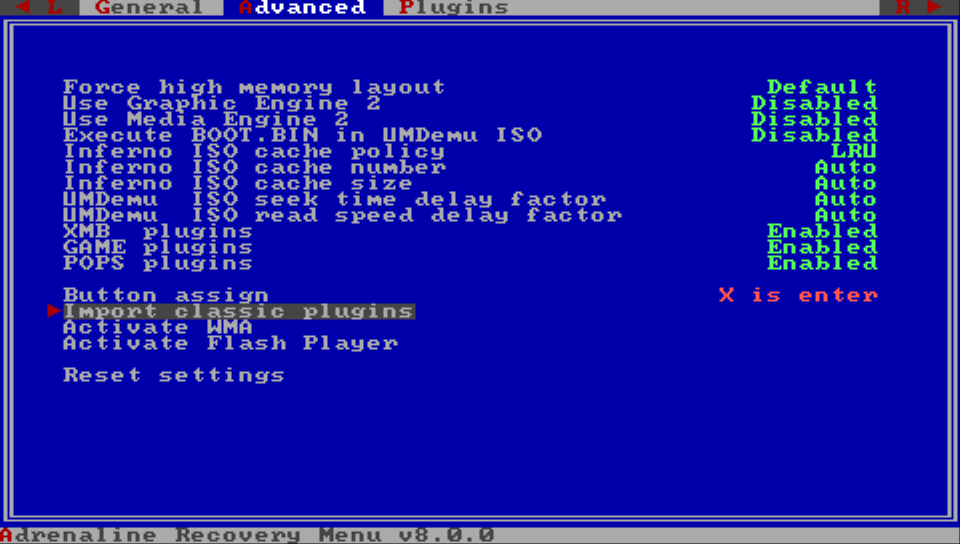
plugin migration instructions
This is how to migrate your plugins to the new format after updating Adrenaline to 8.0.0
- Open Recovery Menu
- Go to the
Advancedsection - Select and click on
Import classic plugins
v7.1.7
- Fix autoboot.
- Support vita firmwares 3.71-3.74.
v7.1.6
- Fix recovery plugin manager.
v7.1.5
- New recovery/installer.
- Support for displaying manuals for ISO-format games.
v7.1.4
- Revert fancier recovery for now (breaks installer)
v7.1.3
- Don’t load plugins in recovery (for real).
- Support for downloading official updates for EBOOT/ISO.
- Support for updates/dlc for EBOOT/ISO.
- Support for autoboot /PSP/GAME/EBOOT.PBP.
- Update version in LiveArea automatically.
- Support for logging psp printf’s via catlog.
v7.1.2
- Fixed photo/video browser.
- Don’t load plugins in recovery.
v7.1.1
- Fixed version info.
v7.1
- Fixed XMB camera app.
- Added support for PS2/PS3 <-> PSP game link.
- Cleaner recovery with adjustable color.
v7
- Fixed issue where plugins were loaded in recovery mode.
- Moved native display buffer to a different location, so GePatch works for some more games. Please note that only GePatch v0.18 or above will only work, older versions will cause a black screen. If you’re using GTANativeRes, please download the latest binary as well.
v6.9
- Added support for native resolution patches.
v6.8
- Added sharp bilinear without scanlines filter. Thanks to rsn8887.
- Fixed PS1 slowdowns. Thanks to rsn8887.
- Fixed compatibility with h-encore 2.0.
- Fixed compatibility with udcd_uvc.skprx plugin.
v6.7
- Added support for PS1 multiplayer on PS Vita using an upcoming DS3/DS4 plugin.
v6.6
- Fixed bug from previous update that caused black screen in other DJ max games.
- Inferno driver was not included correcty, now it is.
- Tekken 6 can now be played with any CPU speed.
v6.5
- Added updated inferno driver by codestation which improves performance of CSO reading.
- Added option to choose USB device.
- Added xmc0: option.
- Fixed stupid mistake that made DJ max portable 1 crash. Install it again, because this has been added post-release
- Fixed little bug in msfs.
- Removed savestate version restriction, old savestates will not disappear anymore.
v6.4
- Added ability to fast forward in PS1 games by pressing L+SELECT.
- Fixed double launch bug when using without enso. You need to add the kernel module to config to do so.
v6.3
- Added support for 3.68.
- Added ability to freely adjust the screen size to your desire in both psp and ps1 modes.
- Removed ‘Screen Mode’ and ‘Screen Size’ from menu.
- Improved Adrenaline Menu.
v6.2
- Added f.lux by Rinnegatamante.
- Fixed PS1 framerate when using custom screen.
- Fixed bug where exiting a game with ‘High memory layout’ would crash.
- Fixed compatibility with ‘Kingdom Hearts: Birth by Sleep’ english patch, again.
v6.1
- Added support for 3.65/3.67.
v6 fix
- Fixed bug where CSO games freezed up the system.
v6
- Redesigned boot process. Adrenaline does now not require any basegame or activation anymore.
- Added ‘uma0:’ to ‘Memory Stick Location’.
- Added support for longer ISO filenames.
- Fixed Memory Stick free space integer overflow in games like Outrun.
- Fixed bug where ISO games did not show up when the folder ‘PSP/GAME’ was missing.
- Improved core and fixed some small bugs.
v5.1
- Added ability to skip adrenaline boot logo.
- Added message for original filter.
- Fixed bug where payloadex was not updated and caused some bugs.
- Fixed ‘20000006’ bug on PS TV. Network update will work on PS TV in the future.
- Changed CPU clock back to 333 MHz.
v5
- Added ‘Hide DLC’s in game menu’ functionality.
- Readded ‘Original’ graphics filtering, since PS1 games have got framedrops using custom filters.
- Fixed corrupted icons bug that was introduced in the previous update.
- Fixed bug where the framebuffer was corrupted after loading savestate.
- Adrenaline icon is now hidden in game menu.
v4.2
- Added support for ISO sorting using ‘Game Categories Lite’ plugin.
- Fixed compatiblity with ‘Kingdom Hearts: Birth by Sleep’ english patch.
v4.1
- Fixed bug where holding R trigger while launching Adrenaline didn’t open the recovery menu.
- Fixed msfs truncation bug that caused savedata corruption for Little Big Planet and maybe other games.
- Fixed wrong scale of PS1 games on PS TV.
v4
- Added custom graphics filtering support for PS1 games.
- Added screen mode adjustment for PS1 games. If you’re using this feature on a PS Vita, select ‘Original’ screen mode in the official settings, then apply the custom screen mode. On the other hand, if you want to the screen mode of the official settings, select ‘Original’ screen mode in Adrenaline settings. On a PS TV this will finally allow you to play your games in fullscreen.
- Added screenshot support in PS1 games.
- Added network update feature for future updates.
- Fixed a bug in msfs driver that caused weird behavior in XMB after resuming from standby.
- Removed ‘Official’ graphics filtering in order to support the features mentioned above.
v3.1
- Added support for cwcheat in PS1 games.
- Fixed sound problems after exiting a PS1 game.
- Fixed ‘Please wait…’ bug in some games.
- Fixed problem where mounting ur0: as USB device would cause problems in livearea.
v3 fix
- Fixed bug where ‘Cannot find application’ would show up instead of returning to livearea.
- Fixed bug where you couldn’t access the Adrenaline Menu after enabling/disabling wifi.
v3
- Added ability to launch PS1 games from XMB and play them with full sound.
- Added ability to save and load states using the ‘States’ tab in the Adrenaline menu.
- Added possibility to connect USB in XMB and added ‘Toggle USB’ option to recovery menu.
- Added ability to return to livearea by double tapping the PS button.
- Added Adrenaline startup image designed by Freakler.
- Added option to force high memory layout. For ‘The Elder Scrolls Travels: Oblivion’ Demo.
- Added option to execute ‘BOOT.BIN’ in UMD/ISO. For ‘Saints Row: Undercover’ Demo.
- Added correct enter and cancel buttons assignment.
- Fixed volatile memory allocation bug that made ‘Star Wars: The Force Unleashed’, ‘Tony Hawk’s Project 8’ and maybe more games crashing.
- Fixed bug that was introduced in v2 which caused some games to crashed at PMF sequences.
- Fixed NoDrm engine bug where fan translated games couldn’t load PGD decrypted files.
- Fixed msfs directory filter bug that caused some games not to recognize savedatas.
- Fixed compatiblity of base games, any game should now be able to use Adrenaline to the fullest.
v2
- Added 64MB RAM support for homebrews.
- Added ability to use the ‘ur0:’ partition as Memory Stick.
- Added Advanced AA filter (disable ‘Smooth Graphics’ for that filter).
- Added ability to change smooth graphics (GPU internal bilinear filter).
- Added ability to change screen size (2.0x, 1.75x, 1.5x, 1.25x, 1.0x).
- Fixed sound issue in ‘MotorStorm’ and some other games.
- Fixed bug where ‘ms0:/MUSIC’ and ‘ms0:/PICTURE’ were not found in XMB.
- Fixed bug where changing options in the official settings menu didn’t have any effect.