Adrenaline Application Settings
A tab in the Adrenaline Menu that allows adjusting various settings related to Adrenaline Application.
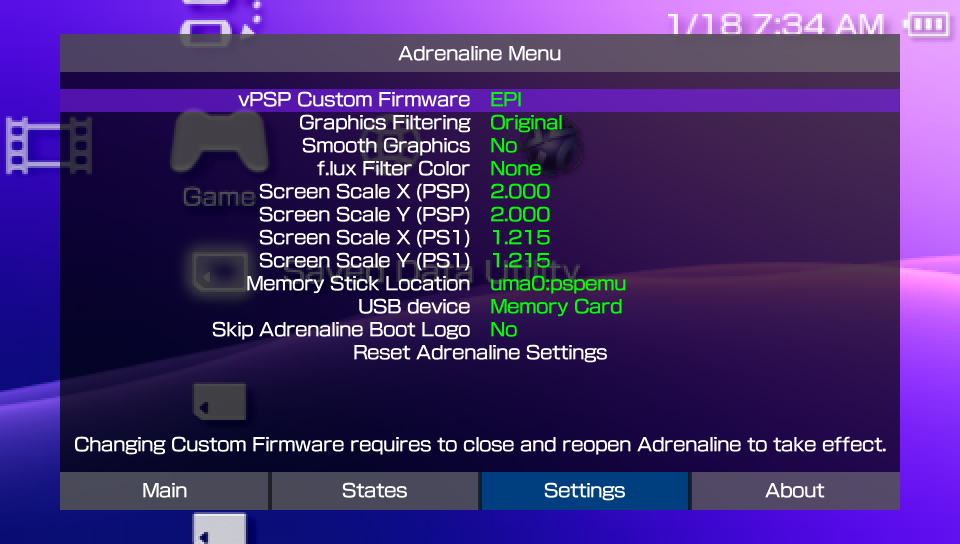
vPSP Custom Firmware
Chooses the PSP Custom Firmware that is going to be loaded by the Adrenaline Application into the vPSP environment.
The available options are:
- EPI: Uses the CFW that comes with Adrenaline.
- ARK: Uses the ARK CFW.
note
The ARK options is only available if you have ARK savedata files properly installed. Otherwise, only the EPI will be available.
Adrenaline searches for ARK savedata files on the selected Memory Stick Location option first, and falls back to search on ux0:/pspemu if not found.
important
Changing vPSP Custom Firmware requires to close and reopen the Adrenaline Application to take effect.
Graphics Filtering
Applies graphical filters in the Vita/PSTV screen while the Adrenaline App is open.
It offers these options:
- Original: No filtering is applied; displays the original PSP graphics.
- Bilinear: Smooths out pixel edges for a softer look.
- Sharp Bilinear: Slightly sharper smoothing than bilinear and with scanline effect.
- Advanced AA: Advanced Anti-Aliasing. Reduces jagged edges, making graphics less blocky.
- LCD3x: Simulates the look of an LCD screen, with subtle scanline effect.
- Sharp Bilinear without Scanlines: Like Sharp Bilinear, but without the scanline effect.
- Scale2x: Increases the size by 2x of small bitmaps by guessing the missing pixels without blurring the images, making graphics less blocky.
- Scale2x Plus: Improvement of the
Scale2x, by using pixel interpolation to decide the color of the pixels. - Scale3x: Same as
Scale2x, but increases the size by 3x instead of 2x.
important
When the Original option is selected, all graphics-related options will not take effect.
tip
You can hide the Adrenaline Menu to better see the effects of this options by holding the SQUARE button.
Smooth Graphics
When enabled, apply a stronger smooth effect filter on top of the filter selected on Graphical Filtering configuration.
tip
You can hide the Adrenaline Menu to better see the effects of this options by holding the SQUARE button.
f.lux Filter Color
Configures a color filter option that will be applied on top of the other filters.
The available options are:
- None
- Yellow
- Blue
- Black
tip
You can hide the Adrenaline Menu to better see the effects of this options by holding the SQUARE button.
Screen Scale X/Y (PSP)
Allows to adjust the horizontal (X) and vertical (Y) scaling of the PSP screen within Adrenaline on XMB/VSH and PSP games/homebrew/applications. This allows you to change the size and aspect ratio of the application display to better fit your Vita/PSTV screen and/or the users’ preferences.
tip
You can hide the Adrenaline Menu to better see the effects of this options by holding the SQUARE button.
Screen Scale X/Y (PS1)
Same as Screen Scale X/Y (PSP), but exclusively on PS1 games/homebrew.
tip
You can hide the Adrenaline Menu to better see the effects of this options by holding the SQUARE button.
grayjack personal preference
For this config, I like to set it to 1.215 on both X and Y axis. Maximizes the size while maintaining the original game proportions.
Memory Stick Location
Chooses the drive Adrenaline App shows up for the chosen CFW as the Memory Stick drive (ms0:).
The options are:
ux0:pspemuur0:pspemuimc0:pspemuxmc0:pspemuuma0:pspemuuma0:
The uma0: option can be used to facilitate PS3<->PSVITA data share (e.g. savedata files) for people that does that frequently.
System Storage Location
Chooses the drive Adrenaline App shows up fot the chosen CFW as the System Storage drive (ef0:).
The options are:
Disableduma0:pspemuxmc0:pspemuux0:pspemuuma0:
The Epinephrine CFW has support to show the System Storage drive on the XMB/VSH and able to use it on the XMB with some limitation (currently):
- Unable to boot PS1 titles from
ef0: - The XMB is not showing the System Storage free space
- The Saved Data Utility for the system storage doesn’t work on the XMB
- The XMB context menu doesn’t open in the System Storage items
info
The System Storage will not show in the XMB/VSH when using ARK, but software is able to see and handle the drive. Launching titles can be done by using the ARK’s Custom Launcher.
The same limitations apply to using Adrenaline with ARK, although the most affected for ARK is the boot of PS1 titles.
USB device
Selects the device that will show up when connecting the Vita to a system via USB.
The options are:
- Memory Card
- Internal Storage
- sd2vita
- psvsd
Skip Adrenaline Boot Logo
When enabled, it skips the Adrenaline logo at the start of the Adrenaline Application.