Adrenaline Project
The Adrenaline Project turns the PS Vita’s PSP emulator into a highly-featured virtual PSP running a Custom 6.61 PSP Firmware, with extra Vita-side integrations.
The Adrenaline Peoject is two software projects in one: Adrenaline Application (1) and Epinephrine CFW (2).
- Adrenaline is a software that modifies the official PSP Emulator (PSPemu/ePSP) using taiHEN CFW framework to make it possible to run a Custom PSP 6.61 Firmware (CFW). It is also the software that handles the Vita-side integrations with the PSP firmware and hardware.
- Epinephrine is a Custom Firmware for the Vita’s PSPemu derived from TN-V CFW that, besides usual PSP CFW features, it helps to get access to PSP XMB and most of the PSP native environment in the PSPemu.
info
Sony’s unmodified PSPemu has a more limited environment, tailored to be enough to run what Sony released on the PS Store.
info
Thanks to the power of taiHEN, Adrenaline can inject custom code into the IPL, which allows unsigned code to run at boot-time.
Quick Feature Set Overview
Adrenaline Application
- Compatible with all PS Vita models on firmware 3.60 up to 3.74
- Support 8 graphical filtering options
- Support color filter
- Support to PS1 game overlay image filter
- Support for PS2/PS3 <-> PSP game link
- Configurable vPSP Custom Firmware
- Configurable PSP and PS1 screen scale
- Configurable Memory Stick driver location
- Configurable USB device to use when connecting Vita to devices via USB
- Save states
Epinephrine CFW
- XMB/VSH on ePSP
- Almost entire PSP 6.61 environment available on ePSP (we call it Virtual PSP, or vPSP for shortness)
- Support executing PSP unsigned code execution (homebrew software, PSP/PS1 backups)
- Support executing PS1 custom games with support for external configuration files that allow easy fixing of games.
- Support manual for game images (ISO/CSO/etc)
- Support for game updates and DLC for both game images (ISO/CSO/etc) and EBOOT
- Configurable CPU/BUS clock for XMB/VSH and PSP games/homebrew/apps
- Three ISO image driver options: Inferno, March33, NP9660
- Support for ISO, CSO, JSO, ZSO, CSOv2, and DAX image formats
- Built-in anti-CFW, fixes some protections and bugs in games.
- Built-in CFW configuration and plugin manager on XMB/VSH for easy CFW management
- Support for autoboot software on system launch if enabled
- Extensive CFW API with good compatibility with M33, ME, PRO, and ARK API
- Resulting in good compatibility with plugins and homebrew apps and/or easier porting effort for projects using CFW API
Adrenaline Key Combos Cheat Sheet
| Key Combo | Event | Availability |
|---|---|---|
| PS button 2x | Return to Vita live area | Anytime |
| Hold R | Start CFW on Recovery mode | On Adrenaline App bubble start |
| L+Select | Toggle PS1 Fast Forward | PS1/POPS titles |
| Hold Square | Hide Adrenaline Menu | When Adrenaline Menu is open with graphic settings selected |
Epinephrine CFW Key Combos Cheat Sheet
| Key Combo | Event | Availability |
|---|---|---|
| L+R+Down+Select | Fast exit to XMB/VSH | Anytime on XMB or PSP title |
| L+R+Down+Start | Fast exit to XMB/VSH | Anytime on XMB or PSP title |
| L2+R2+Down+Select | Fast exit to XMB/VSH | Anytime on PS1 title on Vita |
| L2+R2+Down+Start | Fast exit to XMB/VSH | Anytime on PS1 title on Vita |
| Select | Open VSH Menu | XMB/VSH |
| Hold L | Plugins disabled | On PSP/PS1 title Reset/Power-on/launch |
| Hold R | Execute BOOT.BIN in UMDemu ISO | On PSP ISO title and games launch |
Installation & Updates
Installation
It is recommended to do this approach for a fresh installation. Otherwise, use the Update section.
- Remove the Adrenaline bubble and the
ux0:app/PSPEMUCFW/sce_module/adrenaline_kernel.skprxpath from the taiHEN config.txt and finally reboot your device. - Download Adrenaline.vpk and install it using VitaShell.
- Launch Adrenaline and press
Xto download the 6.61 firmware. After finishing, it will automatically terminate. - Relaunch Adrenaline; this time, it will go into PSPemu mode. Follow the instructions on the screen.
getting rid of the double launch bug
Adrenaline needs to launch twice every time you reboot your device. This is done automatically but that increases the boot time for Adrenaline.
To get rid of such a limitation, simply write this line to *KERNEL section of you ur0:/tai/config.txt file:
*KERNEL
ux0:app/PSPEMUCFW/sce_module/adrenaline_kernel.skprx
After that, Adrenaline will only need to be launched once, improving the time to boot the vPSP environment.
Update
If you have already been using Adrenaline, you have three update options: Manual, Update PBP, and Network.
Manual
- Download Adrenaline.vpk
- Open the vpk file as a zip
- Copy all files from
sce_moduledirectory toux0:app/PSPEMUCFW/sce_module
Update PBP
- Download the updater EBOOT.PBP (or updater.zip)
- If
updater.zip, extract and use theEBOOT.PBPinside it. - Put the file at
ux0:/pspemu/PSP/GAME/UPDATE/directory (create it if needed) - Launch Adrenaline
- Run the update application
Network
- Launch Adrenaline
- On the XMB/VSH, go to System Settings > System Update
- Press
Xto download the update with the console.
important
If you have installed a version below v7.1.0, the network update won’t work; you will have to update with one of the other two remaining methods.
important 2
If you have installed a nightly version, the network update won’t work; you will have to update with one of the other two remaining methods.
Adrenaline Menu
Adrenaline Menu is a menu that you access Adrenaline information, Adrenaline Application settings, the save state feature, and more.
The Adrenaline Menu
To open the Adrenaline menu, you have to:
- Hold the
HOMEbutton to open the PSVita/PSTV’s Quick Menu - Click on the
Settingsbutton on the screen
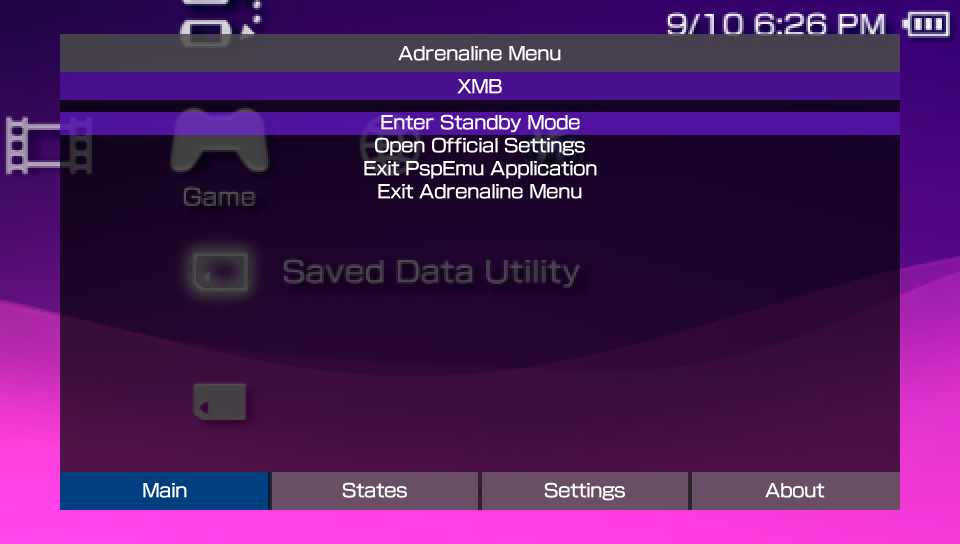
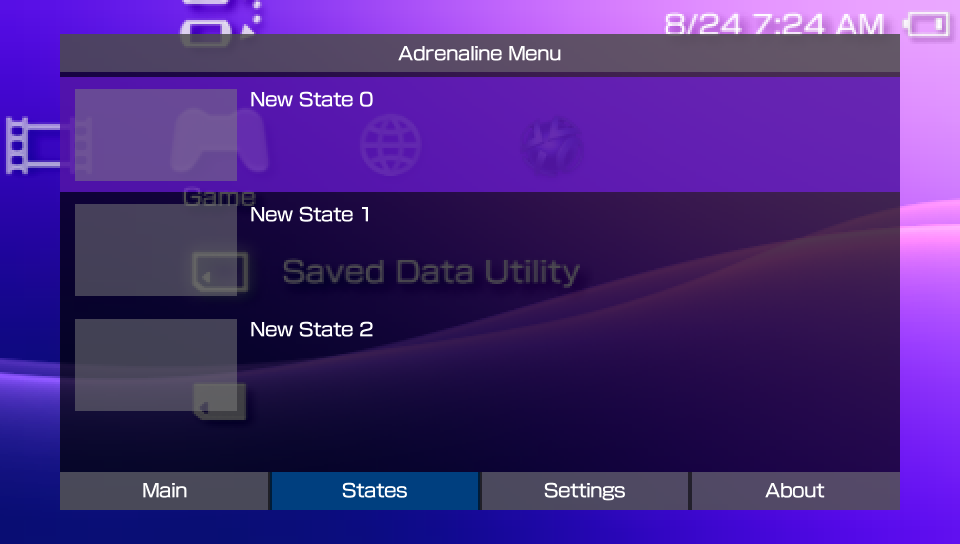
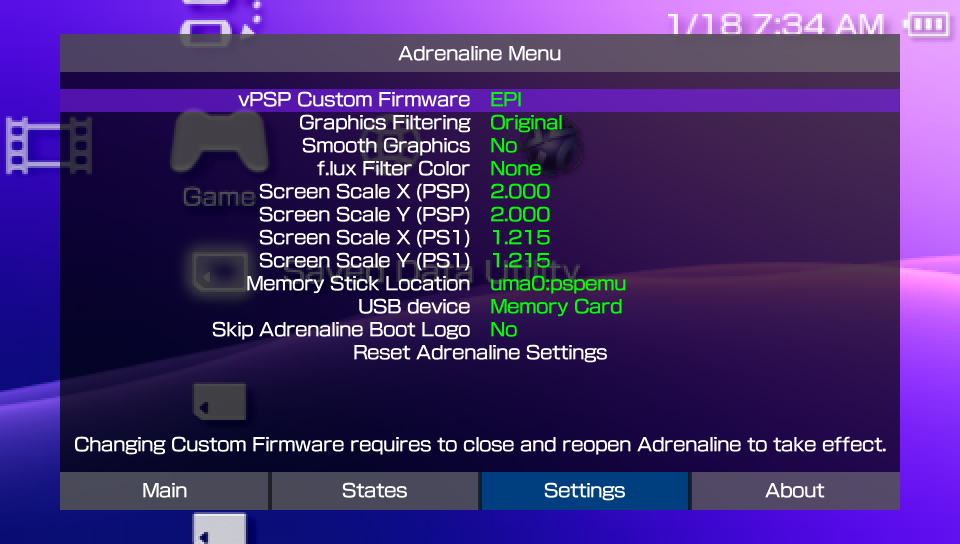
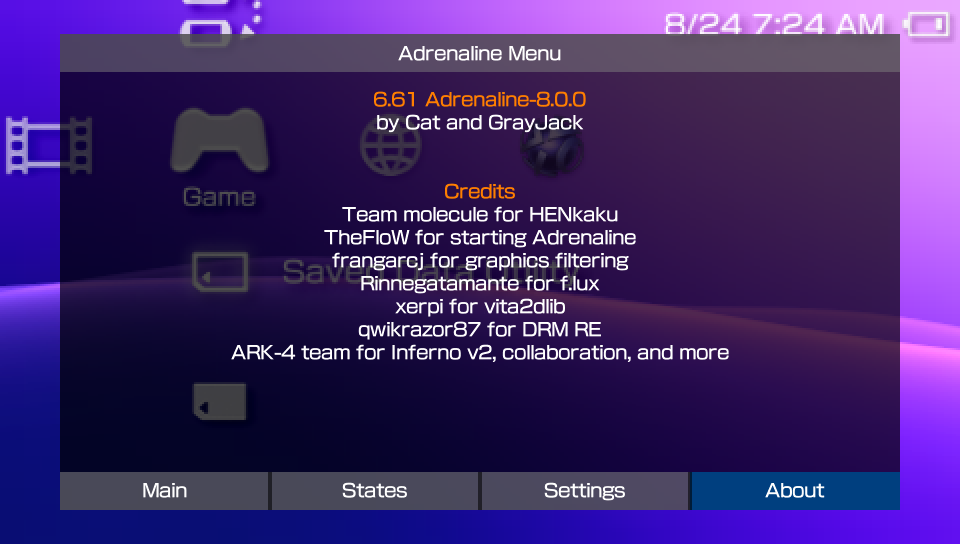
Once opened, you can notice it has four tabs: Main, States, Settings, and About.
Main tab
This tab has the launched application information (title and title ID) and the most basic options, detailed bellow.
Enter Standby Mode: Make the system enter standby modeOpen Official Settings: Opens the official PSVita/PSTV PSPemu game settingsExit PspEmu Application: Exits the applicationExit Adrenaline Menu: Closes the menu
States
This tab has the front UI for the native save state feature of Adrenaline. You can find more information on this feature on the Save State page.
Settings
This tab has the Adrenaline App configuration options. You can find more information on each of the settings at Adrenaline Settings page.
About
This tab shows the Adrenaline version and credits.
Adrenaline Save State
Adrenaline has native support to Save States, accessible in the Adrenaline Menu. It supports the creation of up to 31 save states.
What is a Save State
A save state is a snapshot of the current status of a game, allowing you to save and restore your progress at any point. Unlike traditional in-game saves, save states capture everything in memory, so you can resume exactly where you left off, even if the game itself doesn’t support saving at that moment.
Creating Save State
To create a save state, do the following:
- Open Adrenaline Menu
- Hold the
HOMEbutton to open PSVita/PSTV’s Quick Menu - Click on the
Settingsbutton on the screen
- Hold the
- Press
LorRuntil you reach the States tab - Select an empty state slot
- Press
X, select Save State, and pressXto save the state
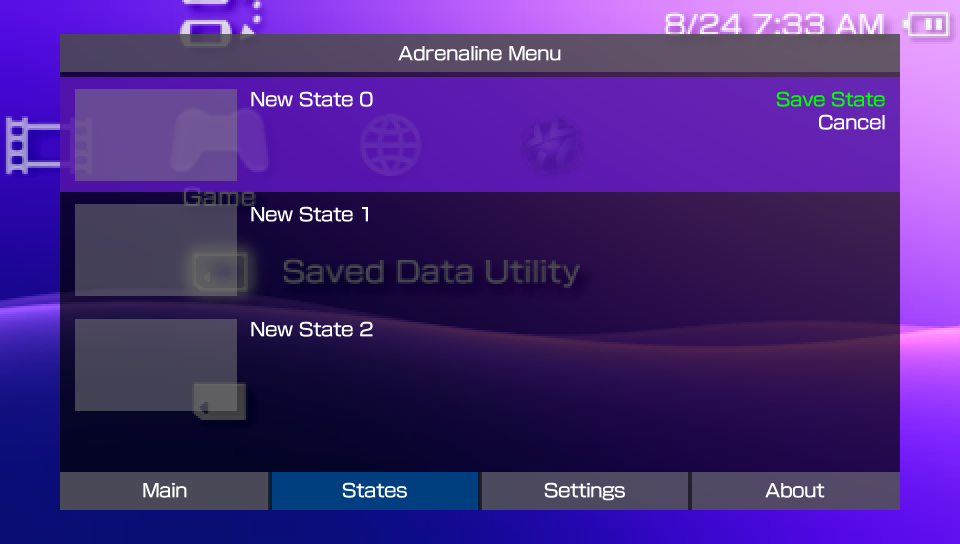
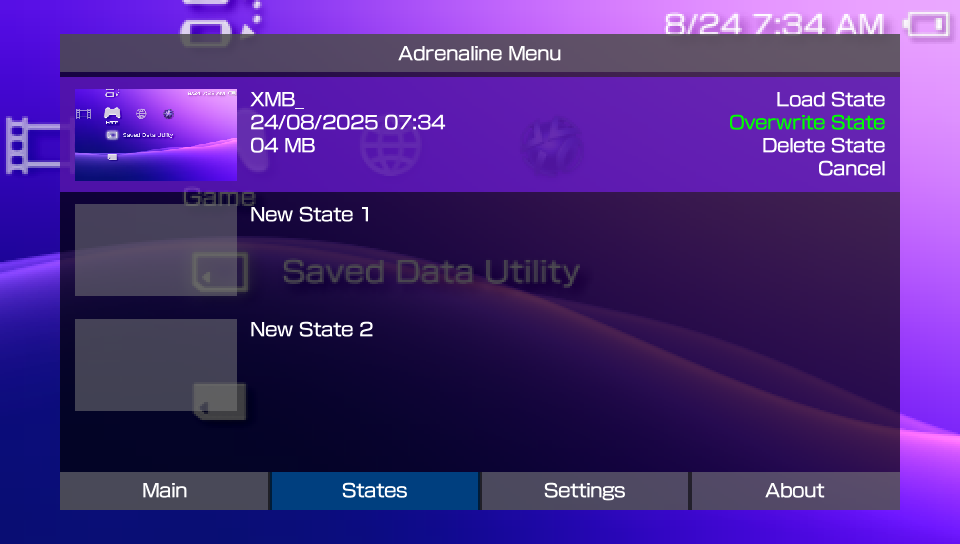
Alternatively, you can save the state by substituting a previously saved state (i.e. overwriting the save state):
- Open Adrenaline Menu
- Hold the
HOMEbutton to open the PSVita/PSTV’s Quick Menu - Click on the
Settingsbutton on the screen
- Hold the
- Press
LorRuntil you reach the States tab - Select an empty state slot
- Press
X, select Overwrite State, and pressXto overwrite the state
Loading Save State
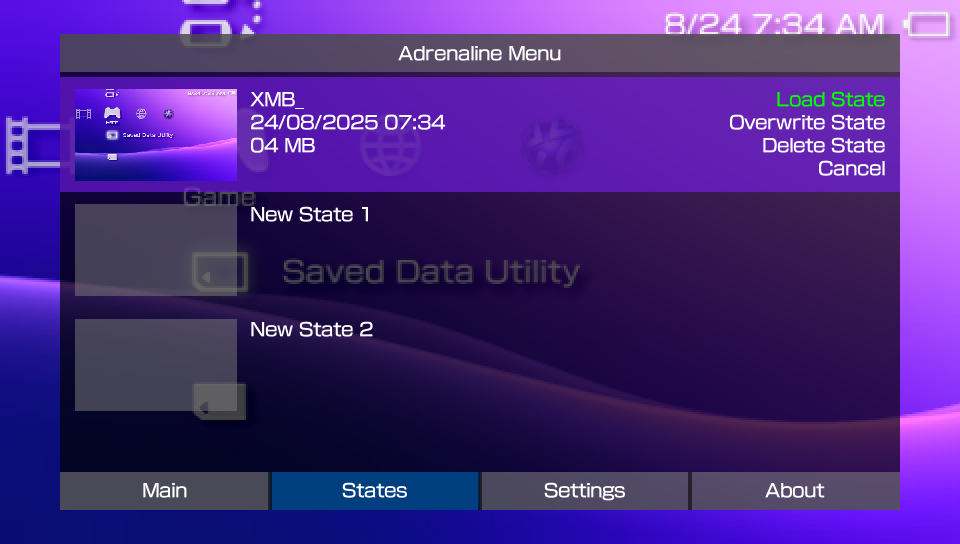
To load a save state, do the following:
- Open Adrenaline Menu
- Hold the
HOMEbutton to open PSVita/PSTV’s Quick Menu - Click on the
Settingsbutton on the screen
- Hold the
- Press
LorRuntil you reach the States tab - Select a saved state slot
- Press
X, select Load State, and pressXto load the state
Deleting Save State
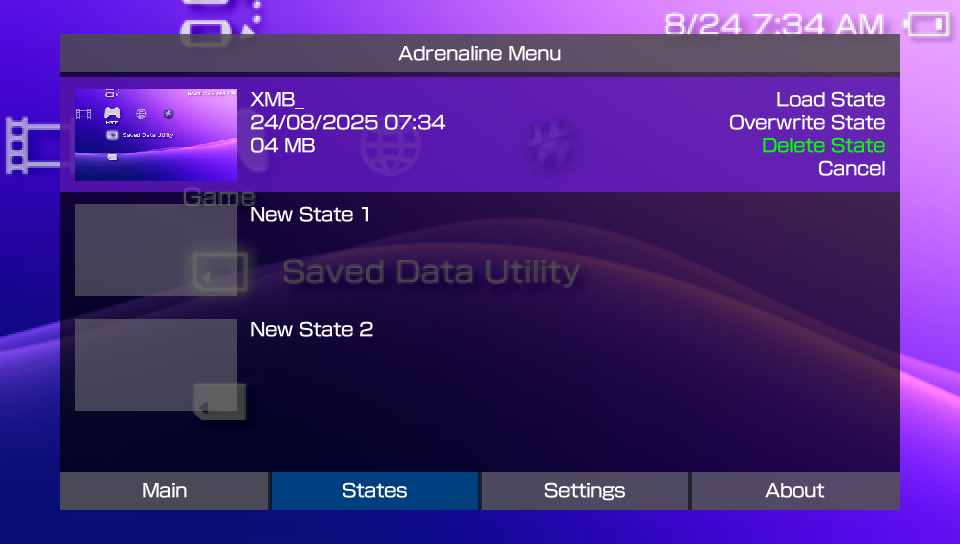
To delete a save state, do the following:
- Open Adrenaline Menu
- Hold the
HOMEbutton to open PSVita/PSTV’s Quick Menu - Click on the
Settingsbutton on the screen
- Hold the
- Press
LorRuntil you reach the States tab - Select a saved state slot
- Press
X, select Delete State and pressXto delete the state
Adrenaline Application Settings
A tab in the Adrenaline Menu that allows adjusting various settings related to Adrenaline Application.
vPSP Custom Firmware
Chooses the PSP Custom Firmware that is going to be loaded by the Adrenaline Application into the vPSP environment.
The available options are:
- EPI: Uses the CFW that comes with Adrenaline.
- ARK: Uses the ARK CFW.
note
The ARK options is only available if you have ARK savedata files properly installed. Otherwise, only the EPI will be available.
Adrenaline searches for ARK savedata files on the selected Memory Stick Location option first, and falls back to search on ux0:/pspemu if not found.
important
Changing vPSP Custom Firmware requires to close and reopen the Adrenaline Application to take effect.
Graphics Filtering
Applies graphical filters in the Vita/PSTV screen while the Adrenaline App is open.
It offers these options:
- Original: No filtering is applied; displays the original PSP graphics.
- Bilinear: Smooths out pixel edges for a softer look.
- Sharp Bilinear: Slightly sharper smoothing than bilinear and with scanline effect.
- Advanced AA: Advanced Anti-Aliasing. Reduces jagged edges, making graphics less blocky.
- LCD3x: Simulates the look of an LCD screen, with subtle scanline effect.
- Sharp Bilinear without Scanlines: Like Sharp Bilinear, but without the scanline effect.
- Scale2x: Increases the size by 2x of small bitmaps by guessing the missing pixels without blurring the images, making graphics less blocky.
- Scale2x Plus: Improvement of the
Scale2x, by using pixel interpolation to decide the color of the pixels. - Scale3x: Same as
Scale2x, but increases the size by 3x instead of 2x.
important
When the Original option is selected, all graphics-related options will not take effect.
tip
You can hide the Adrenaline Menu to better see the effects of this options by holding the SQUARE button.
Smooth Graphics
When enabled, apply a stronger smooth effect filter on top of the filter selected on Graphical Filtering configuration.
tip
You can hide the Adrenaline Menu to better see the effects of this options by holding the SQUARE button.
f.lux Filter Color
Configures a color filter option that will be applied on top of the other filters.
The available options are:
- None
- Yellow
- Blue
- Black
tip
You can hide the Adrenaline Menu to better see the effects of this options by holding the SQUARE button.
Screen Scale X/Y (PSP)
Allows to adjust the horizontal (X) and vertical (Y) scaling of the PSP screen within Adrenaline on XMB/VSH and PSP games/homebrew/applications. This allows you to change the size and aspect ratio of the application display to better fit your Vita/PSTV screen and/or the users’ preferences.
tip
You can hide the Adrenaline Menu to better see the effects of this options by holding the SQUARE button.
Screen Scale X/Y (PS1)
Same as Screen Scale X/Y (PSP), but exclusively on PS1 games/homebrew.
tip
You can hide the Adrenaline Menu to better see the effects of this options by holding the SQUARE button.
grayjack personal preference
For this config, I like to set it to 1.215 on both X and Y axis. Maximizes the size while maintaining the original game proportions.
Memory Stick Location
Chooses the drive Adrenaline App shows up for the chosen CFW as the Memory Stick drive (ms0:).
The options are:
ux0:pspemuur0:pspemuimc0:pspemuxmc0:pspemuuma0:pspemuuma0:
The uma0: option can be used to facilitate PS3<->PSVITA data share (e.g. savedata files) for people that does that frequently.
System Storage Location
Chooses the drive Adrenaline App shows up fot the chosen CFW as the System Storage drive (ef0:).
The options are:
Disableduma0:pspemuxmc0:pspemuux0:pspemuuma0:
The Epinephrine CFW has support to show the System Storage drive on the XMB/VSH and able to use it on the XMB with some limitation (currently):
- Unable to boot PS1 titles from
ef0: - The XMB is not showing the System Storage free space
- The Saved Data Utility for the system storage doesn’t work on the XMB
- The XMB context menu doesn’t open in the System Storage items
info
The System Storage will not show in the XMB/VSH when using ARK, but software is able to see and handle the drive. Launching titles can be done by using the ARK’s Custom Launcher.
The same limitations apply to using Adrenaline with ARK, although the most affected for ARK is the boot of PS1 titles.
USB device
Selects the device that will show up when connecting the Vita to a system via USB.
The options are:
- Memory Card
- Internal Storage
- sd2vita
- psvsd
Skip Adrenaline Boot Logo
When enabled, it skips the Adrenaline logo at the start of the Adrenaline Application.
PSP Homebrew Support
Epinephrine support launching unsigned homebrew applications directly from the XMB/VSH, and loading plugins with a powerful configuration format.
All user-mode PSP homebrew since PSP Firmware (FW) 3.71 onwards should work fine. Kernel-mode PSP homebrew, on the other hand, may require a build specifically targeted to PSP firmware 6.60 or 6.61 to work on Epinephrine.
Homebrew Apps
PSP homebrew applications are custom software created by the community that can run on the PSP hardware, ranging from games, emulators, and utilities (like media players and file managers).
Homebrew applications must be live on ???0:/pspemu/PSP/GAME/ directory to appear in the XMB/VSH.
Homebrew plugins
Homebrew plugins are programs in the form of PRX files that can add extra features and/or modify the behavior of the PSP system and games.
Homebrew plugins .prx files must be put in the ???0:/pspemu/seplugins/ folder and be added to the configuration file ???0:/pspemu/seplugins/plugins.txt or ???0:/pspemu/seplugins/EPIplugins.txt.
info
PSP filepaths are case insensitive. For that reason, files and directories inside the Vita/PSTV ???0:/pspemu/ directory can be all uppercase letters, lowercase letters, or a mix, and it will work normally.
So don’t worry if you find variations in paths like /SEPLUGINS/plugins.txt, or even crazy paths like /SePlUgInS/pLuGiNs.TxT.
The following pages provide more detailed information on plugins.
Legacy 1.50 Homebrew
There is some support for legacy FW 1.50 homebrew, but it is not very well tested. If you have any legacy 1.50 homebrew, try to find out if it works on Adrenaline.
what do i do if my legacy 1.50 homebrew fails to run?
You are encouraged to open an issue on Adrenaline Issue Tracker. Please, remember to give as much information as possible so the developers can better find potential solutions for the issue.
PSP Plugin
PSP plugins are small programs (usually .prx files) that add new features or modify the behavior of the PSP system or games.
Epinephrine should be compatible with most of the plugins made for classic PSP CFW, but incompatibilities may happen. Plugins that replace the VSH Menu (i.e. System Menu, Ultimate VSH Menu, etc) are not supported.
tip
If you find a plugin that is not working, first open an issue on the plugin project issue tracker before opening an issue on the Adrenaline issue tracker.
If you end up opening an issue on Adrenaline’s issue tracker, be mindful that issue resolution depends on many factors, as developers’ time, developers’ interest in the issue, external contributions, and more; as with any hobbyist open-source project.
Launch without plugins
Epinephrine allows launching software without plugins by holding the L trigger while launching apps/games/XMB.
This feature can be useful for quickly checking whether issues with a software are related to broken/bugged plugins or to plugins that don’t interact well with the software.
Adding a plugin
- Put the
.prxfile somewhere on???0:/pspemu/seplugins/directory (create if it doesn’t exist) - Open the
???0:/pspemu/seplugins/plugins.txt(create if it doesn’t exist)
- This is the same file as ARK CFW uses, that will be shared with both CFWs
- Optionally, you can create and use
???0:/pspemu/seplugins/EPIplugins.txtto have a separate plugin configuration file from ARK
-
Add to the configuration line in the general format:
⟨RUNLEVELS⟩, ⟨PLUGIN PATH⟩, ⟨on/off⟩- Example:
psp, ms0:/seplugins/my_plugin.prx, on - You can find detailed information on the format on the next page
- You can find a configuration example here
- Example:
important
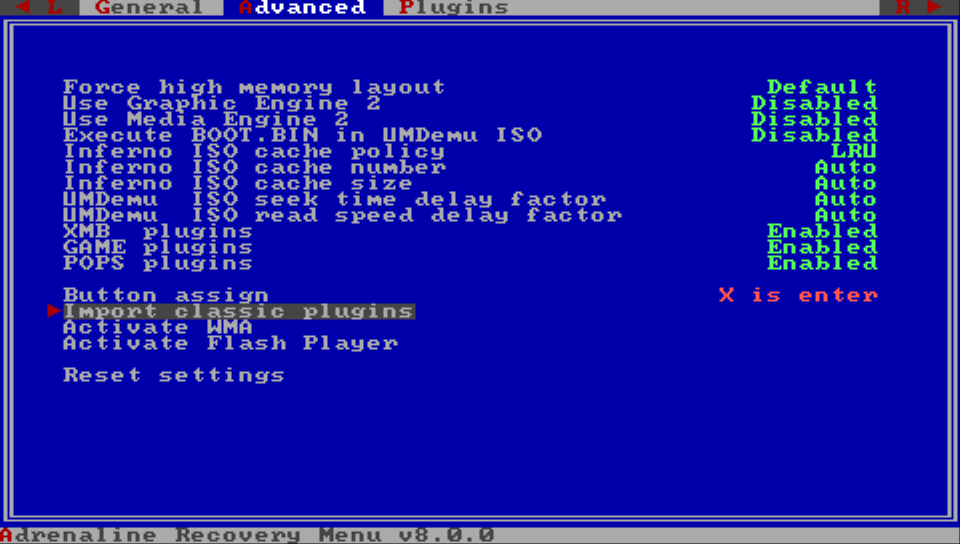
Before version 8.0.0, EPI used another format and files for the plugins
If you just updated from the previous version, EPI provides an easy way to import the old style to the new:
- Open Recovery Menu
- Go to the
Advancedsection - Select and click on
Import classic plugins
Managing Plugins
Epinephrine offers two ways to manage plugins already added.
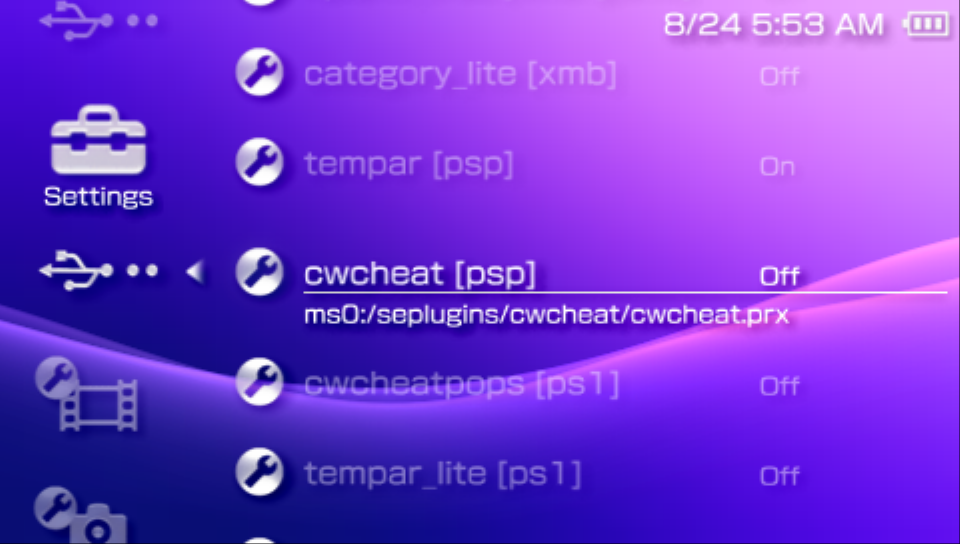
First method: XMB Settings
-
On XMB, go to the
Settings -
Find the
★ Plugins Managerand the confirmation button, and a list of added plugins will show up -
Select the plugin, click the confirmation button.
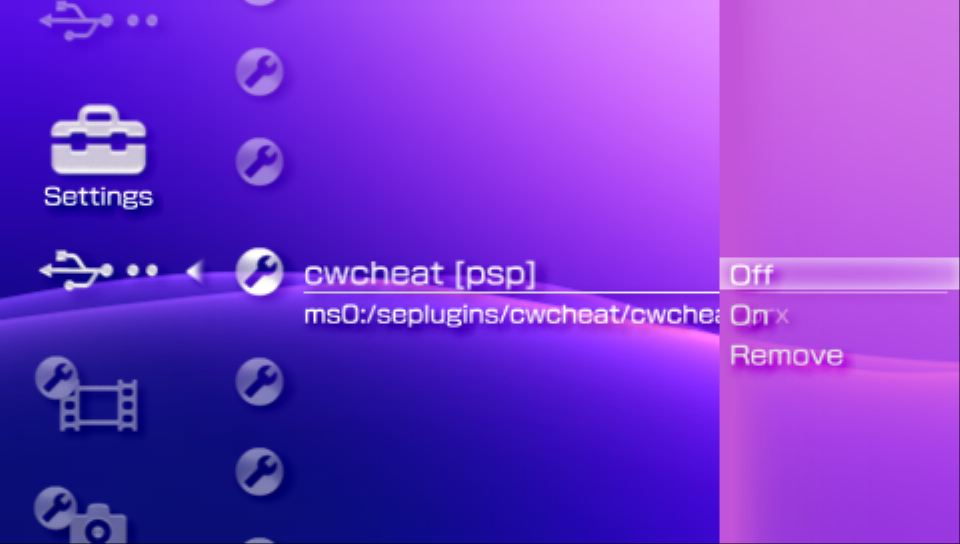
-
Select the state (
on/off/remove), confirm with the confirmation button.- The
removeoption will remove the line from the configuration file and restart the system
- The
-
Return to save configuration.
warning
Modification of the plugin state on any plugin that has XMB/VSH runlevel (xmb/vsh) needs to restart the XMB/VSH to take effect.
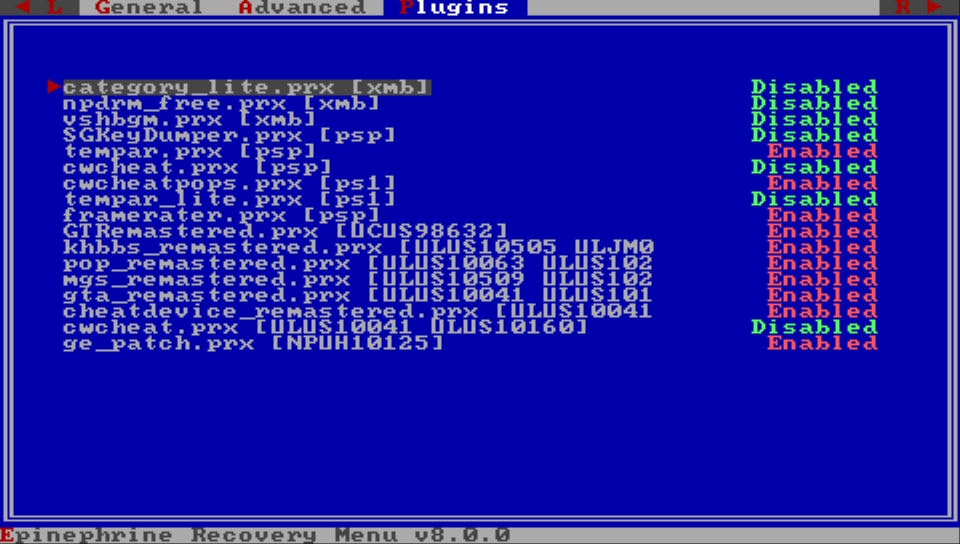
Second method: Recovery Menu
- Open Recovery Menu
- Go to the
Pluginssection - Go over your plugins and use
←/→to select the plugin state - Go back to the
Generalsection - Exit the Recovery Menu
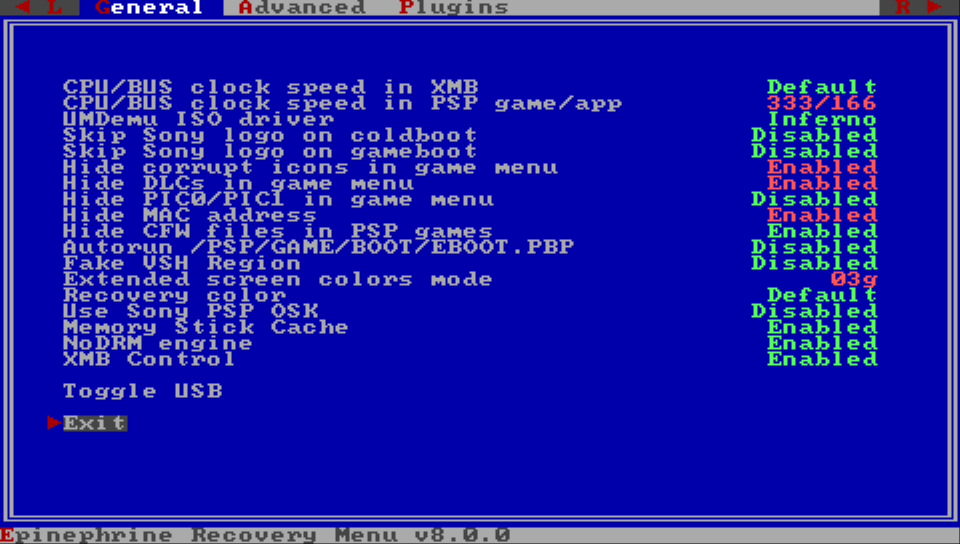
Plugin Configuration Format
The configuration format for the plugins on EPI is composed of three sections per line: runlevel(s), plugin path, and switch state (on/off), separated by a comma.
It also accepts line comments with // and #.
Runlevels
The available runlevels are:
vsh/xmb: VSH runlevel — Plugins configuration for XMB/VSHumd/psp/umdemu: UMD runlevel — Plugins configuration for retail application and gamespops/ps1/psx: POPS runlevel — Plugins configuration for PS1 application and gameshbw/homebrew: Homebrew runlevel — Plugins configuration for homebrew application and gamesapp/game: UMD + Homebrew — Plugins configuration for any PSP application or game; retail or homebrewalways/all: All runlevels — Plugins configuration for all runlevels⟨TITLE ID⟩: Application/Game specific runlevel — Plugins configuration for a specific application that has the specified ID⟨PATH⟩: Path-specific runlevel — Plugins configuration for an application or game in the specified path. This is more advancedcfw=??: Custom Firmware runlevel — Plugins configuration to only run in the specified vPSP Custom Firmware
You can specify more than one runlevel for a specific plugin by separating with a space character, more on example.
Plugin Path
The plugin path can be an absolute path or a relative path.
The absolute path must be a PSP Memory Stick absolute path, i.e. starting with ms0:/. The relative path starts on ms0:/seplugins/, e.g. if the file is on ms0:/seplugins/my_plugin.prx, you can use my_plugin.prx.
Switch state
The switch state defines whether the plugin is enabled or not. The accepted “On” values are on, enabled, true, and 1; and the “off” values are off, disabled, false, and 0.
example
# VSH Example
xmb, ms0:/seplugins/category_lite.prx, on

# PSP retail games example
psp, ms0:/seplugins/TempAR/tempar.prx, on

# Homebrew-only example
hbw, ms0:/seplugins/example.prx, off

# POP example
pops, ms0:/seplugins/cwcheat/cwcheatpops.prx, on

# Any PSP (game and homebrew)
app, ms0:/seplugins/example.prx, off

# Always
always, ms0:/seplugins/example.prx, off

# CFW
always cfw=ark, ms0:/seplugins/example.prx, off

# Title ID example
ULES00151, ms0:/seplugins/gta_remastered.prx, on

# Path example
ms0:/ISO/my_iso.iso, ms0:/seplugins/example.prx, off
disc0:/PSP_GAME/USRDIR/ys1.bin, ms0:/seplugins/example.prx, off

# Relative path example
psp, cwcheat/cwcheat.prx, off

# Multiple runlevels
ULUS10505 ULJM06213, ms0:/seplugins/khbbs_remastered.prx, on

# You can also disable plugins for certain applications
# Enable on every game
psp, ms0:/seplugins/cwcheat/cwcheat.prx, on
# This will filter out GTA LCS (US) and GTA VCS (EU)
ULUS10041 ULES00502, ms0:/seplugins/cwcheat/cwcheat.prx, off
important
Before version 8.0.0, EPI used another format and files for the plugins
Homebrew plugins used to be put in one of three files:
- In
/pspemu/seplugins/VSH.TXTfile for the plugin to loaded on XMB/VSH - In
/pspemu/seplugins/GAME.TXTfile for the plugin to be loaded on PSP games and homebrews - In
/pspemu/seplugins/POPS.TXTfile for the plugin to loaded on PS1 games and homebrews
And following the format of ⟨PLUGIN PATH⟩ ⟨0 or 1⟩ per plugin.
If you just updated from the previous version, EPI provides an easy way to import the old style to the new:
- Open Recovery Menu
- Go to the
Advancedsection - Select and click on
Import classic plugins
Notable Plugins
Game Categories Lite
This plugin lets you organize your games in subfolders where you can more easily find them and have the XMB load them faster. An important plugin these days of high capacity memory sticks that fit hundreds of games, way more than the PSP was supposed to handle with its limited memory.
This plugin should be enabled for VSH (also known as XMB) mode only.
example
On ???0:/pspemu/seplugins/plugins.txt, add the following line:
vsh, ms0:/seplugins/category_lite.prx, on
important
This plugin must be the first vsh context plugin listed.
Download Game Categories Lite by wad11656: This one has support for Epinephrine System Storage support.
Download Game Categories Lite by ticky
Vshbgm
This plugin allows to execute a user-provided mp3 as a background music on the VSH (XMB).
Music automatically stops for media playback, UMD games, or other sounds. Giving you a smooth audio experience while navigating your XMB menus.
The plugin expects the mp3 file to be in a very specific format. But no worries, as the site provides a way to convert it in the site, not only that, you can provide more than one mp3 source, it also merge the files in a single mp3 file, giving a experience similar to having a mini playlist as background music.
The MP3 file is expected to be in ???0:/pspemu/bgm.mp3.
This plugin should be enabled for VSH (also known as XMB) mode only.
Download vshbgm Here Convert MP3 Here
example
On ???0:/pspemu/seplugins/plugins.txt, add the following line:
vsh, ms0:/seplugins/vshbgm.prx, on
XMB Item Hider
A plugin to hide XMB menu items. It has support to work together with Game Categories Lite.
example
On ???0:/pspemu/seplugins/plugins.txt, add the following line:
vsh, ms0:/seplugins/xmbih.prx, on
CXMB
With this plugin you can install custom XMB themes made by the community.
This plugin should be enabled for VSH (also known as XMB) mode only.
important
This plugins must be installed in the ???0:/pspemu/CXMB/cxmb.prx path or else it will refuse to work.
example
On ???0:/pspemu/seplugins/plugins.txt, add the following line:
xmb, ms0:/CXMB/cxmb.prx, on
PRO Online
An important plugin that brings back Online functionality to the PSP on many games.
On Epinephrine this plugin is compatible with the “Inferno Cache” settings.
important
This plugin should be enabled for TITLE ID, or limited testing of GAME mode ONLY
example
Note that this example if for Motorstorm Artic Edge US version, change or add TITLE IDs according to the games you want that it enabled.
On ???0:/pspemu/seplugins/plugins.txt, add the following line:
UCES01250, ms0:/seplugins/atpro.prx, on
GePatch
An experimental plugin for Epinephrine that allows to run a few games in native resolution.
important
This plugin should be enabled for TITLE ID, or limited testing of GAME mode ONLY.
And this plugins in incompatible with the Force High Memory CFW configuration, so it is best to disable this configuration before starting a game with this plugin
Link to the compatibility list spreadsheet
example
Note that this example if for Final Fantasy III US version, change or add TITLE IDs according to the games you want that it enabled.
On ???0:/pspemu/seplugins/plugins.txt, add the following line:
NPUH10125, ms0:/seplugins/ge_patch.prx, on
Remastered Controls Collection
A collection of plugins for Epinephrine and ARK (on PSVita/PSTV) that enhance the controls of various PSP titles to better use the PSVita/PSTV controller inputs (like the right joystick).
It includes plugins for:
Kingdom Hearts: Birth by SleepandKingdom Hearts: Birth by Sleep Final MixGrand Theft Auto: Liberty City StoriesandGrand Theft Auto: Vice City StoriesTomb Raider: AnniversaryandTomb Raider: LegendSplinter Cell: EssentialsResitance: RetributionPrince Of Persia: RevelationsandPrince Of Persia: Rival SwordsMetal Gear Solid: Peace Walker,Metal Gear Solid: Portable OpsandMetal Gear Solid: Portable Ops PlusThe WarriorsTony Hawk's Project 8
important
This plugin should be enabled for TITLE ID ONLY.
Download Remastered Controls Plugins Here
example
Note that this example if for Kingdom Hearts: Birth By Sleep US version, change or add TITLE IDs and plugin path according to the games you want that it enabled.
On ???0:/pspemu/seplugins/plugins.txt, add the following line:
ULUS10505, ms0:/seplugins/khbbs_remastered.prx, on
TempAR PSP
TempAR is a complete rewrite of the popular PSP cheat device NitePR/MKULTRA, with additional features and improvements created by raing3.
example
On ???0:/pspemu/seplugins/plugins.txt, add the following lines:
For PSP games:
psp, ms0:/seplugins/TempAR/tempar.prx, on
For PS1 games:
pops, ms0:/seplugins/TempAR/tempar_lite.prx, on
CWCheat
A cheat device compatible with every game. Requires an updated cheat database to recognize most games.
It can be enabled on every game, but should be disabled for GTA games where their specific cheatdevice is preferred.
Download latest cheat database Here
example
On ???0:/pspemu/seplugins/plugins.txt, add the following lines:
For PSP games:
psp, ms0:/seplugins/cwcheat/cwcheat.prx, on
For PS1 games:
pops, ms0:/seplugins/cwcheat/cwcheatpops.prx, on
GTA LCS and VCS cheatdevice remastered
A must have plugin for every fan of GTA on the PSP console. Allows for cheats as well as mods.
It is recommended to enable these plugins only on the specific GTA games where you’ll be loading them using Adrenaline’s per-game plugins configuration.
important
If you have cwcheat also installed and enabled, it is recommended to have it disabled for the specific GTA games that you’ll be using with cheat device, you can use ARK’s per-game plugins configuration.
Download CheatDeviceRemastered Here
example
Note that this example is for the US version of those games. Change them according to your region.
On ???0:/pspemu/seplugins/plugins.txt, add the following lines:
ULUS10041 ULUS10160, ms0:seplugins/cheatdevice_remastered.prx, on
PSP Playback
Epinephrine allows the user to execute PSP game images, making it possible to play digital copies of PSP games on PlayStation Vita or PSTV. To make it possible, it uses PSP UMDemu drivers, having four available drivers: Inferno 2, March33 2, MinimalEdition 2, and Sony's NP9660
There are three formats of PSP game images: PBP, ISO, and Compressed ISO.
The PBP image format is the official Sony format. It is the format used for PlayStation Network (PSN) digital games, game updates, and game DLCs. For PSN games, Epinephrine CFW always uses the original Sony's NP9660 driver. Usually, PBP files live on ???0:/pspemu/PSP/GAME/⟨TITLE_ID⟩/ directory.
The ISO image format is a 1:1 copy of a Universal Media Disc (UMD), while Compressed ISO is an ISO image compressed in some way to reduce space usage. There are a few competing formats for Compressed ISO: CSO, CSOv2, JSO, ZSO, and DAX, each with different tradeoffs. Epinephrine CFW supports all of those formats and allows you to choose between the three UMDemu drivers available. All of those image options should go in ??0:/pspemu/ISO/ directory.
info
There is a page explaining the different compressed image formats and their tradeoffs.
UMDemu ISO Drivers
This is a brief overview of the features of each driver in the versions that come with Epinephrine CFW.
Inferno 2
This is the default UMDemu ISO driver and the one with the most person-hours put into development over the years. This is a small adaptation of the latest work done hosted on ARK CFW, with minor modifications for better code reuse with other drivers and integration with the Epinephrine CFW.
- Support for all ISO formats:
ISO,CSO,CSOv2,JSO,ZSO, andDAX - Emulation of empty UMD drive: Several bugs existed that caused malfunction when the driver was used without an ISO file specified on other drivers and older versions of this driver.
- Improved Compressed ISO read speeds: Usage of a more efficient algorithm, block offsets cache, and a more aggressive form of the speedup hacks.
- Inferno Cache: Usage of overall caches as another read-time speedup hack. The amount of cache is configurable in the CFW configuration option, limiting a maximum to allow for enough free space for other features or plugins. It is also possible to configure the cache policy strategy between two algorithms: Least Recently Used (
LRU, default) and Random Replacement (RR).LRU: Uses fewer CPU cycles because it will discards the cache slot from the queue that have not been used in a timeframe when new cache item needs to be added.RR: Uses slightly less memory as it doesn’t need to keep track of the least used cache slot.
- Configurable seek and read speed delays: This allows for simulating the disc seek and read time for the drive to behave more similarly as reading from a physical UMD disc, which allows bypassing some forms of anti-CFW checks in some games.
- By default, it is automatically set for games known to include such checks, but it is configurable in the case a user finds a game with checks that are not automatically handled.
- This feature is incompatible with Inferno Cache, enabling this will cause Inferno Cache to be disabled.
March 33 2
March33 driver was originally developed for the March33 CFW by the M33 Team. Epinephrine comes with a modified version with ISO and Compressed ISO read improvements and bug fixes; other than that, there were no other significant changes in the source code.
This driver is made available mostly for compatibility reasons, as historically some games had a better time with this driver than NP9660, ME Driver and Inferno. There are many PSP games and PSP modded games out there; there is a slight chance it can still have better compatibility in niche cases.
- Support for all ISO formats:
ISO,CSO,CSOv2,JSO,ZSO, andDAX. - Improved Compressed ISO read speeds: Usage of a more efficient algorithm, block offsets cache, and a more aggressive form of the speedup hacks.
- Configurable seek and read speed delays: This allows for simulating the disc seek and read time for the drive to behave more similarly as reading from a physical UMD disc, which allows bypassing some forms of anti-CFW checks in some games.
- By default, it is automatically set for games known to include such checks, but it is configurable in the case a user finds a game with checks that are not automatically handled.
Minimal Edition 2
Minimal Edition Driver (a.k.a. ME Driver) was originally developed for the Minimal Edition CFW by neur0n. Epinephrine comes with a modified version with ISO and Compressed ISO read improvements and bug fixes; other than that, there were no other significant changes in the source code.
This driver is made available mostly for compatibility reasons, as historically some games had a better time with this driver than NP9660, March33 Driver and Inferno. There are many PSP games and PSP modded games out there; there is a slight chance it can still have better compatibility in niche cases.
- Support for all ISO formats:
ISO,CSO,CSOv2,JSO,ZSO, andDAX. - Improved Compressed ISO read speeds: Usage of a more efficient algorithm, block offsets cache, and a more aggressive form of the speedup hacks.
- Configurable seek and read speed delays: This allows for simulating the disc seek and read time for the drive to behave more similarly as reading from a physical UMD disc, which allows bypassing some forms of anti-CFW checks in some games.
- By default, it is automatically set for games known to include such checks, but it is configurable in the case a user finds a game with checks that are not automatically handled.
Sony’s NP9660
It is the original PSP UMDemu driver from Sony, but with patches to trick it into running ISO and Compressed ISO formats. This driver is also the one used on PBP games; it has guaranteed compatibility with all games that Sony released on PSN.
This driver is made available for ISO mostly for compatibility reasons, as historically some games had a better time with this driver than March33 Driver, ME Driver and Inferno. There are many PSP games out there, so there is a slight chance it can still have better compatibility in niche cases.
- Support for all ISO formats:
ISO,CSO,CSOv2,JSO,ZSO, andDAX. - Improved Compressed ISO read speeds: Usage of a more efficient algorithm, block offsets cache, and a more aggressive form of the speedup hacks.
- Configurable seek and read speed delays: This allows for simulating the disc seek and read time for the drive to behave more similarly as reading from a physical UMD disc, which allows bypassing some forms of anti-CFW checks in some games, and some games with synchronization issues due to faster read times of ISO.
- By default, it is automatically set for games known to include such checks, but it is configurable in the case a user finds a game with checks that are not automatically handled.
Other ISO features
Epinephrine offers a few other functionalities related to ISO and Compressed ISO that are worth mentioning.
Support for game update and DLC
Epinephrine supports launching ISO games with updates and DLC when installed in their usual place (???0:/pspemu/PSP/GAME/⟨TITLE_ID⟩/PBOOT.PBP). But, as a downside, having this file without EBOOT.PBP in the same folder causes the XMB/VSH to show duplicated items; to solve that, you can enable the Hide DLCs in game menu CFW setting.
Support for manuals
Epinephrine also supports manuals for ISO games. For it to work, the .DAT file must be in the ???0:/pspemu/ISO/ directory with the same name as the ISO game file.
example
For the ISO file in ???0:/pspemu/ISO/my_game.cso, the DAT file should be at ???0:/pspemu/ISO/my_game.DAT
Execute BOOT.BIN instead of EBOOT.BIN
Epinephrine supports launching ISO games/apps executing the BOOT.BIN inside the ISO instead of the EBOOT.BIN by holding R while launching the game/app.
This feature can be used in the few games that requires usage of the BOOT.BIN to work properly, as it is the case for ISO of demos, prototypes, decrypted and modded games.
Compressed ISO Formats
Compressed ISO is an ISO image compressed in some way to reduce the space usage. There are a few competing formats, each with different tradeoffs. The formats are specified below.
Technical Overview
| Format | Author | Supported Algorithm | Supported Block Size | Compression Ratio vs Decompression Speed | Comments |
|---|---|---|---|---|---|
| CSO | by Booster | DEFLATE | Any (2K is Standard) | Great compression size, Slow decompression speed | Uses the same de/compression algorithm as DAX, but a lighter structure. While it supported any block size, the standard was 2K (it was also the only size allowed by compression tools, including the official one), in contrast to DAX’s 8K. Traditionally, this meant DAX was faster as it had to process fewer blocks than CSO, but this is no longer true with the new reader; thus, they both perform the same regardless of block size. However, this also means that standard 2K CSO is bigger than DAX, but CSO compressed using the same 8K block size as DAX actually produces a smaller image. Meaning that an 8K CSO is superior to DAX in every way (this could be the reason DAX himself dropped support for DAX in favor of CSO, though the M33 driver never supported anything other than 2K CSO). |
| DAX | by Dark_AleX | DEFLATE | 8K Only | Great compression size, Slow decompression speed | A competing format of CSO, it uses a slightly different structure, though the compression algorithm is the same. The original version did not allow for Non-Compressed sectors, a feature added in Version 1, though in a complicated and inefficient way. Though the format used to be faster than CSO, this was merely due to unoptimized IO access in the older drivers. Eventually, support for the format was dropped with the M33 CFW. |
| JSO | by Uncle Jam | LZO or DEFLATE | Any | Average compression size, Fast decompression speed | This format was created long ago as a response to the slow nature of unoptimized CSO/DAX readers of the time, and combined technical aspects of both CSO and DAX while also adding its own unique features. It attempted to improve speed by adding support for LZO (de)compression format; however, this had relatively bad results since the main issue with speed on those old drivers was the heavily unoptimized IO calls. It supported either LZO or DEFLATE, but both couldn’t be used at the same time on a single file. |
| ZSO | by Codestation | LZ4 | Any (2K is Standard) | Worst compression size, Fastest decompression speed | This format was created as another late attempt at improving compressed ISO speeds, this time using the incredibly fast LZ4 de/compression algorithm. It was soon discovered that it wasn’t just the compression algorithm that affected the speed of CSO, but the main bottleneck was in the incredibly huge amount of IO calls being done for every single data request by the game (as opposed to a single IO call per data request on ISO). This meant that now standard CSO performs well enough for most cases. |
| CSOv2 | by UnknownBrackets | LZ4 and DEFLATE | Any (8K is Standard) | Good compression size, Good decompression speed | An attempt at combining the good compression ratio of CSO with the great decompression speed of ZSO, it also has some technical aspects from JSO (such as multiple algorithm support and detection of non-compressed blocks). In this format, each block is compressed with either algorithm, meaning that both algorithms are used at the same time throughout the file. |
tldr
Which algorithm to use nowadays largely depends on the use case.
If speed is your priority, then ZSO and JSO are good options, while for space saving, you can use CSO or DAX.
The format can also depend on the game, with more intensive games benefiting more from faster decompression (such as ZSO with GTA games), while with other games the slower decompression only results in a bit more loading times but no difference in gameplay and thus CSO/DAX works fine (such as the case of Minis).
History: Format Wars
Format wars aren’t a thing exclusive to the movie industry, and Sony is certainly no stranger to them, though they had nothing to do with this one (at least initially, they did end up making their own PBP format for PSN releases).
Back when the first ISO drivers showed up on the console, memory sticks weren’t bigger than 2GB, which necessitated the implementation of a space-saving mechanism in the form of a compression format for ISO files.
Compressing an ISO into a ZIP file would not be enough, as you can’t do random-access on ZIP files; you have to decompress the entire file before you can use it. This works for classic retro console roms as they are small enough that the entire file can be loaded into RAM, but for a UMD that can reach up to 1.8GB, this was not going to cut it.
It was then that two formats appeared: Booster’s CSO and Dark_AleX’s DAX formats. On these formats, compression is done on a per-sector (or per-block) basis, rather than the entire file, allowing for random access directly on the compressed file. The only downside is that compressing small chunks instead of the whole file will always be detrimental to the compression ratio; in this case, even though CSO and DAX use the same compression algorithm as ZIP, an ISO compressed into a ZIP file will have slightly better compression. Though this wasn’t too bad and the compression ratio was pretty good anyway, especially with games that used lots of uncompressed data and dummy files (pretty common in optical media).
Each format had its own benefit, with DAX considered to be overall faster and having better compression, but CSO being much simpler and more powerful (in a great moment of “forward thinking”, CSO could actually work on DVD and Blu-ray ISOs, while DAX was limited to UMD and Mini-DVD). Also, while the CSO format was standardized to having 2K blocks, it was meant to use any block size, meaning if they had gone with 8K blocks as DAX had done, then CSO would have been as fast as DAX while being even more compressed (due to being an overall more space-efficient format).
A little bit after the creation of CSO and DAX, a third competitor named JSO entered the scene. Developed by Uncle Jam, the format aimed at using a faster decompression algorithm, LZO in this case, to improve the speed of the format. This never took off, however, and the format never gained much popularity, even though many PC apps at the time would fully support converting to and from this format. The reason for its failure has mainly been related to the unoptimized usage of I/O present in drivers of the era, rendering the speedup gained with the faster decompression function relatively unnoticeable. Though the format has seen a resurrection with ARK-4’s Inferno 2 driver, as it offers the best tradeoff between speed and compression ratio.
Most ISO Drivers (i.e. SE and OE) for a while would implement support for both formats, though eventually Dark_AleX (the most famous PSP CFW developer of all time) would drop support for his own DAX format when the M33 CFW was created.
Because DAX offered faster speeds and better compression than standard CSO files, even though it went unsupported, the format went on to gain a sort of niche following and an aura of being the “superior even if not popular format”, pretty similar to what happened to Betamax.
Interestingly enough, the speed differences between DAX and CSO related to the block size all go away with a properly I/O optimized driver, and a CSO file created using 8K blocks will provide a better compression ratio than DAX.
Fast forward to the end of the PRO era, and a new fourth format arrives on the scene. Created by Codestation, the ZSO format uses the same exact binary structure as a CSO, with the difference of using the much faster LZ4 algorithm to handle compression. The LZ4 algorithm is the fastest algorithm available, though the speed is traded off for compression ratio, having the worst among the different formats. The format, however, reached the same dead end that JSO had found in the day: the bottleneck and main issue that slows down CSO is not the compression algorithm, but the huge amount of I/O calls being issued when reading any compressed format. Once this bottleneck was eliminated, the original CSO format became much faster to use and therefore most people decided to stick with it instead of migrating to ZSO. Where ZSO did find more success was in the PSP’s sister console, the PS2.
Which algorithm to use nowadays largely depends on the use case. If speed is your priority, then ZSO and JSO are good options, while for space saving, you can use CSO or DAX. The format can also depend on the game, with more intensive games benefiting more from faster decompression (such as ZSO with GTA games), while with other games, the slower decompression only results in a bit more loading times but no difference in gameplay and thus CSO/DAX works fine (such as the case of Minis).
Inferno Driver
The Epinephrine version of the Inferno 2 driver is an adaptation from the ARK version of the driver. The ARK version is an evolution of the Inferno Driver found, among others, in the PRO CFW, for which ARK itself is an evolution of.
Evolution of the driver
Several different versions of the Inferno driver were created for different purposes. So let’s look at all of them and try to add a versioning system to them, so we can have an idea of the evolution of this driver. We will start with PRO-C, which we will call Inferno 1.
Inferno 1: The originalInfernodriver as seen in PRO-C. It includes theblock offset cachespeedup hack that greatly improved speed withCSOformat in comparison to traditional drivers such asMarch33 Driver. It also included an overall cache that could use the extra RAM on PSP slims to improve speed, this is known asInferno Cache, though it had conflicts with theForce Extra RAMpatch.Inferno 1V: The originalInfernodriver port forPROVITA, used up to ARK-3. It was a stripped-down version of the one in PRO-C, minus theInferno Cachesince the Vita lacked the PSP Slim’s extra RAM.Inferno 1S: An experimentalInferno 1Vfork that added support for Splitted ISO files (SSO), it was meant to improve the experience of transferring ISO files viaFTP, it was scrapped and never used but source code can still be found in the original ARK-1 repository under the nameinferno.new.Inferno 1D: A port ofInferno 1to the ME CFW with added support for theDAXfile format. It uses two separate algorithms to handleCSOandDAX.Inferno 1.5: Available in PRO-C2, 1.5 is one of the greatest updates to a PSP ISO Driver ever made in regards to Compressed ISO reading speed. Thanks to the research of developerCodestation, we were able to figure out a new speedup hack that proved to be the biggest one yet. It uses the fact that whenever a game requests data, the compressed data is always going to be smaller than the requested data, thus the buffer given by the game can be used to read all the compressed data at once and process each block in place, thus hugely reducing the amount of IO calls to satisfy the data request (which for an ISO is only one IO call), to put it in technical forms, the algorithm went from having a linear O(n) complexity (where n = amount of IO calls) to having the same constant O(1) complexity as an ISO. During this research, Codestation also developed a lightweight version ofCSOcalledZSO, which is structurally identical to aCSOfile but data is compressed using theLZ4instead of the standardDEFLATEalgorithm, which offers the fastest decompression speed available, while being identical toCSOin its structure allowed the same algorithm to be used for both formats.Inferno 1.5V: A stripped-down version of the newly updatedInferno 1.5ported over to Adrenaline. It gets rid ofInferno Cacheas it was considered unnecessary on PS Vita, and also removes support forZSOformat, while maintaining the speedup hacks forCSO. This was the version that Adrenaline used up to version7.1.7.
Now that we’ve covered the evolution of the Inferno Driver over the years, we can focus on all the changes made to it in ARK-4 that justify it being called Inferno 2.
Dynamic Patching: all static offset patching done to the isofs library has been replaced with dynamic patching algorithms. This makesInfernocapable of working on a wide variety of configurations, including the original PSP, unmodified PS Vita Emulator, Adrenaline-patched PS Vita Emulator, and PSP Toolkits such as testkits and devkits.Emulation of Empty UMD Drive: On older versions of Inferno, as well as other UMDemu ISO Drivers, it was never intended for the driver to run without an ISO file to be mounted, thus several bugs existed that caused malfunction when the driver was used without an ISO file specified, this prevented emulation of an empty UMD drive, which was needed on PS Vita to run certain homebrew that checked for a UMD. The main bug was in the implementation of the functionsceUmdCheckMedium, a boolean function used to check if a UMD is inserted in the drive. On the ISO driver, this function was hardcoded to always return true, except if an ISO driver is not specified, then it was hardcoded to wait in an infinite loop until one is (which never happens). The solution used by eCFW, such as ARK (up to ARK-3) and TN-CEF (including Adrenaline), was to include a small dummy fake.cso file to mount when no ISO file is specified. On the newInferno 2driver, among other things, this function has been corrected to behave exactly like the original, simply returning False if no ISO has been specified, thus allowing the ISO driver to simulate an empty UMD drive by loading it without an ISO file specified.Completely revamped Compressed ISO Reader: TheCSOdriver available with the original Inferno was heavily hardcoded to work only withCSOand only with the PSP. The entire reader was completely rewritten from scratch with much less and lighter code, much more portability (it has been ported to PC, PS2/OPL, and Wii/Nintendont), as well as a much more generic and configurable structure, allowing for easily adding support for other formats without changing the core reader.Improved Compressed ISO Read Speeds: Not only is the algorithm written with efficiency in mind, it also implements a more aggressive form of the speedup hacks seen onInferno 1.5.Support for other compressed formats: The new reader was also made to be easily configurable and expandable to support other formats, having been given support for not onlyCSOandZSOas seen onInferno 1.5, but also adds support forDAXas seen on ME’s Inferno update as well as early SE/OE CFW, as well as the rarely seen beforeJSOandCSOv2formats. The driver also supports different block sizes, with 2K and 8K being more common (the higher the block size, the better the compression, but also the more memory used by the driver and thus less available for plugins). All formats benefit equally from the speedup hacks, meaning that performance is mainly left to the decompression algorithm they use.Improved Inferno Cache compatibility: Issues between Inferno Cache and Force Extra RAM have been resolved, including being able to use it with PRO Online, as well as allowing the use of Inferno Cache on PS Vita and PSP 1K.Physical UMD seek and read time simulation: Configurable option to simulate the seek time and read time of reading a physical UMD to bypass the anti-CFW checks of some games, or fix games with synchronization issues due to faster read times.Native Patches for DJ Max Anti-CFW speed check: Adds a in-driver patches that bypass the infamous anti-CFW measures of the DJ Max franchise related to driver speed.
March33 Driver
The Epinephrine March33 2 driver is an evolution of the March33 Driver of the classic, and very popular, M33 CFW.
Evolution of the driver
The March33 driver was originally developed by the M33 Team for their custom firmware M33 CFW. The detailed evolution of the driver can’t be known besides release notes from the M33 CFW, as back in the day, closed-source development was the norm, and, according to Dark_AleX, the team had other reasons to maintain their software closed-source. So let’s do a quick dive and try to give an idea of the evolution of this driver. We will start with 3.51—M33-3, which was the debut of the driver. The following version is a ludic version number; we will consider all reported changes as the last release of the same base OFW version.
March33 1.0: The originalMarch33driver. Debuted on 3.51—M33-3 in July 2007. It had support forISOandCSOimage formats and was the version that the later version of M33 CFW would improve upon.March33 1.1: An natural evolution fo theMarch33driver. Released in 3.51—M33-7, in the same month as the1.0. The release changelog indicated improved loading speed ofISOandCSO.March33 1.2: Pretty much only bug fixing and some compatibility improvements. Released on 3.71—M33-3 in November of the same year.March33 1.3: Increased compatibility with games and bug fixes. Released on 3.90—M33-3 in March of 2008. There were no further notable mentions in the changelogs of versions after this one. This release is the most important as it is the version that was open-sourced years later, in 2017, after all members of the team agreed to release it.- Since there were no further notable mentions on the changelogs, we are considering the binary version used on later CFW is this one, or very close to it, patched to work on later versions of the PSP Firmware.
- The Epinephrine version was initially based on this version.
March33 RE: A reverse-engineered version of theMarch33driver made available in the ME CFW with added support for theDAXimage format.
Now that we’ve covered the history and evolution of the March33 Driver over the years, we can focus on the changes made to it in EPI that justify it being called March33 2.
Support for other compressed formats: The new reader was also made to be easily configurable and expandable to support other formats, having been given support for not onlyCSOandZSO, but also adds support forDAXas seen on ME’s March33 update, as well as the rarely seen beforeJSOandCSOv2formats. The driver also supports different block sizes, with 2K and 8K being more common (the higher the block size, the better the compression, but also the more memory used by the driver and thus less available for plugins). All formats benefit equally from the speedup hacks, meaning that performance is mainly left to the decompression algorithm they use.Emulation of Empty UMD Drive: On older versions of March33, as well as other ISO Drivers except Inferno 2, it was never intended for the driver to run without an ISO file to be mounted, thus several bugs existed that caused malfunction when the driver was used without an ISO file specified, this prevented emulation of an empty UMD drive, which was needed on PS Vita to run certain homebrew that checked for a UMD. The main bug was in the implementation of the functionsceUmdCheckMedium, a boolean function used to check if a UMD is inserted in the drive, on ISO driver this function was hardcoded to always return true, except if an ISO driver is not specified, then it was hardcoded to wait in an infinite loop until one is (which never happens). The solution used by eCFW such as ARK (up to ARK-3) and TN-CEF (including Adrenaline) was to include a small dummy fake.cso file to mount when no ISO file is specified. On the newMarch33 2driver, among other things, this function has been corrected to behave exactly like the original, simply returning False if no ISO has been specified, thus allowing the ISO driver to simulate an empty UMD drive by loading it without an ISO file specified.Improved Compressed ISO Read Speeds: Not only is the algorithm written with efficiency in mind, it also implements a more aggressive form of the speedup hacks.Physical UMD seek and read time simulation: Configurable option to simulate the seek time and read time of reading a physical UMD to bypass the anti-CFW checks of some games, or fix games with synchronization issues due to faster read times.Native Patches for DJ Max Anti-CFW speed check: Adds a in-driver patches that bypass the infamous anti-CFW measures of the DJ Max franchise related to driver speed.
Minimal Edition Driver (ME Driver)
The Epinephrine Minimal Edition 2 driver is an evolution of the Minimal Edition Driver of the popular, Minimal Edition CFW also known as (L)ME CFW.
note
This has nothing to do with Media Engine, which also is abbreviated as ME.
Evolution of the driver
The ME driver was originally developed by neur0n for their custom firmware (L)ME CFW. It started as a reverse engineer of the March33 Driver when it was closed-source, but then it started to evolve as the ME CFW was being developed. Back then, the ME CFW also called this driver as “March33 Drive” for it’s history of the March33 driver reversed engineered. The following version is a ludic version number; we will consider all reported changes as the last release of the same base OFW version.
ME Driver 1.0: A reverse-engineered version of theMarch33driver made available in the ME CFW.ME Driver 1.5: An natural evolution fo theMinimalEditiondriver by the latest release of the ME CFW.
Now that we’ve covered the history and evolution of the MinimalEdition Driver over the years, we can focus on the changes made to it in EPI that justify it being called MinimalEdition Driver 2.
Support for other compressed formats: The new reader was also made to be easily configurable and expandable to support other formats, having been given support for not onlyCSOandZSO, but also adds support forDAXas seen on ME’s March33 update, as well as the rarely seen beforeJSOandCSOv2formats. The driver also supports different block sizes, with 2K and 8K being more common (the higher the block size, the better the compression, but also the more memory used by the driver and thus less available for plugins). All formats benefit equally from the speedup hacks, meaning that performance is mainly left to the decompression algorithm they use.Emulation of Empty UMD Drive: On older versions of ME Driver, as well as other ISO Drivers except Inferno 2, it was never intended for the driver to run without an ISO file to be mounted, thus several bugs existed that caused malfunction when the driver was used without an ISO file specified, this prevented emulation of an empty UMD drive, which was needed on PS Vita to run certain homebrew that checked for a UMD. The main bug was in the implementation of the functionsceUmdCheckMedium, a boolean function used to check if a UMD is inserted in the drive, on ISO driver this function was hardcoded to always return true, except if an ISO driver is not specified, then it was hardcoded to wait in an infinite loop until one is (which never happens). The solution used by eCFW such as ARK (up to ARK-3) and TN-CEF (including Adrenaline) was to include a small dummy fake.cso file to mount when no ISO file is specified. On the newME Driver 2driver, among other things, this function has been corrected to behave exactly like the original, simply returning False if no ISO has been specified, thus allowing the ISO driver to simulate an empty UMD drive by loading it without an ISO file specified.Improved Compressed ISO Read Speeds: Not only is the algorithm written with efficiency in mind, it also implements a more aggressive form of the speedup hacks.Physical UMD seek and read time simulation: Configurable option to simulate the seek time and read time of reading a physical UMD to bypass the anti-CFW checks of some games, or fix games with synchronization issues due to faster read times.Native Patches for DJ Max Anti-CFW speed check: Adds a in-driver patches that bypass the infamous anti-CFW measures of the DJ Max franchise related to driver speed.
Galaxy Controller
wait... not np9660?
Yes, Sony’s NP9660 driver is very closed-source and without much information about improvements over time, so there is nothing to talk about it. On the other hand, we have something to talk about, even if little, of the thing that tricks Sony’s NP9660 into executing ISO and Compressed ISO image files.
The Galaxy Controller is the software that tricks Sony’s NP9660 Driver into executing ISO and Compressed ISO image files.
The Epinephrine Galaxy Controller is a mix of the Galaxy Controller of ARK-3 and M33 CFW since version 8.0.0. On previous versions of Adrenaline, it came with a binary source of M33 Galaxy Controller.
Historically, there were many versions of Galaxy Controller created. Most of them seem to have come into existence in their own way, except for the ARK-1/2/3 version, which was a direct continuation from the PRO CFW version. That doesn’t matter much for this plugin, though, since all of them do pretty much the same thing, and the performance differences came down to the reading speed of PSP image formats being dependent more on the image-reading implementation of each project than on the patches to the NP9660 Driver.
The current Epinephrine version reuses the image-reading code for all ISO drivers (and also to show the images on XMB/VSH); for that reason, it contains all the improvements related to reading PSP image files in the NP9660 Driver once Galaxy Controller patches it.
Support for other compressed formats: The new reader was also made to be easily configurable and expandable to support other formats, having been given support for not onlyCSOandZSO, but also adds support forDAXas seen on ME’s March33 update, as well as the rarely seen beforeJSOandCSOv2formats. The driver also supports different block sizes, with 2K and 8K being more common (the higher the block size, the better the compression, but also the more memory used by the driver and thus less available for plugins). All formats benefit equally from the speedup hacks, meaning that performance is mainly left to the decompression algorithm they use.Improved Compressed ISO Read Speeds: Not only is the algorithm written with efficiency in mind, it also implements a more aggressive form of the speedup hacks.Physical UMD seek and read time simulation: Configurable option to simulate the seek time and read time of reading a physical UMD to bypass the anti-CFW checks of some games, or fix games with synchronization issues due to faster read times.
PS1 Playback
Epinephrine allows the user to execute official PS1 games and custom PS1 games/applications on PlayStation Vita or PSTV.
A custom PS1 game/app needs to be in the PSP EBOOT.PBP format and be stored on ???0:/pspemu/PSP/GAME/⟨TITLE_ID⟩/ directory. Once added, the game/app can be launched from the XMB without any further configuration.
tip
The recommended tool to convert a custom PS1 game/app to a PSP format is pop-fe as it not only supports other platforms such as PS2 and PS3, but it also has improved compatibility with converted games thanks to the use of a database of custom configuration files for many games and game versions.
caution
An older alternative to pop-fe is PSX2PSP, it is an unmaintained project and has lower compatibility than pop-fe, more so in the case of VITA/PSTV. A game converted with PSX2PSP will show up in Adrenaline, and most likely run, but will be unable to use custom POPS configuration, as the tool doesn’t add a required section in the outputted PBP file to do custom POPS configuration injection.
Adrenaline and Epinephrine comes with a set of added features tailored for better game experience and better support of custom PS1 games/apps.
Fast-forward
Adrenaline can increase the speed of a running PS1 app/game. You can toggle this feature by pressing L+Select while a PS1 app/game is running.
This feature is more often used to speed-up repetitive gameplay, or skip slow sections & cutscenes.
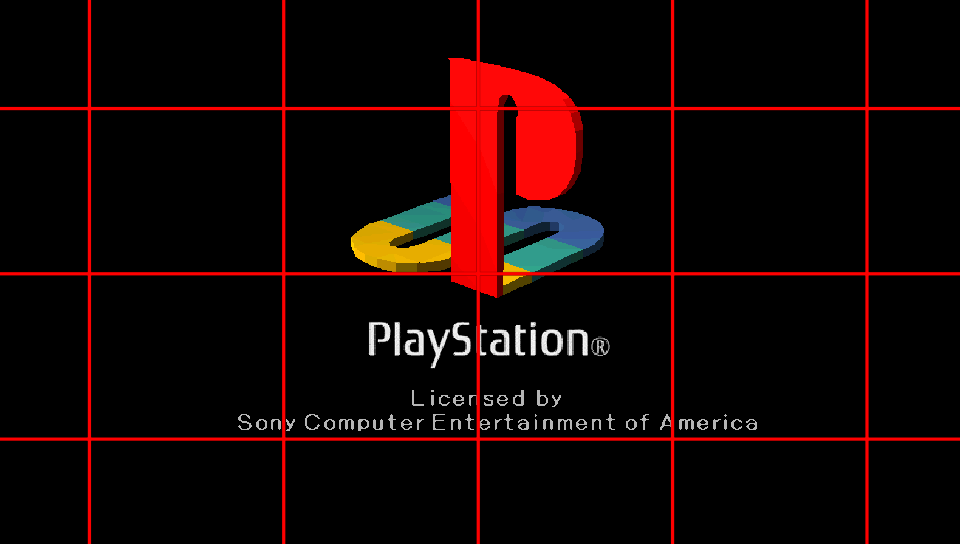
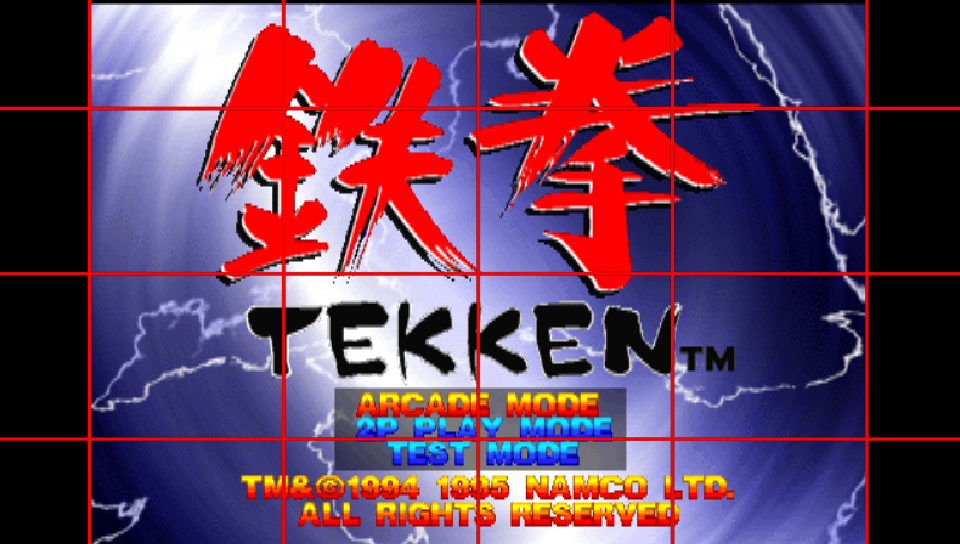
Overlay Image
With Adrenaline, you can include an extra overlay filter based on an image that can be used to decorate the empty space on the sides of the game or custom scanline textures.
One image overlay per PS1 game can be set. The image should be 960x544 pixels and be in the RGBA color format to work properly. And the image must be stored as ???0:/pspemu/overlays/⟨TITLE_ID⟩.png.
warning
This only take effect with Graphics Filtering option different than Original.
tip
Getting the TITLE_ID is simple: launch the app/game and opening the Adrenaline Menu in the Main tab.
It is better explained how to get it in the FAQ.
example
Note: This is an not useful example; made just to show off clearly the overlay working.
CDDA Support
CD Direct Audio was one of the methods (along with the proprietary XA format) to encode sound in PS1 games. Games that use CDDA are usually separated into different tracks, with the first one being the main data track and the rest being CD audio tracks. Many regular CD players were capable of playing these audio tracks when a PS1 disc was inserted.
The PS1 emulator was originally coded to use CD audio tracks packaged into the EBOOT itself, however on later firmware revisions, Sony decided to replace those CDDA tracks with equivalent tracks encoded (and compressed) in AT3 format, which the PSP could also decode and play, this was done to drastically reduce the size of some PS1 games that used a lot of the disc space for CDDA.
Though Sony replaced CDDA with AT3, they didn’t really remove the ability to play CDDA-encoded games; they just disabled it.
A plugin known as cdda_enabler developed by theFl0w was released to re-enable CDDA functionality in the PS1 emulator, allowing games encoded with the older format to be playable with full working sound (whereas before they would produce no sound).
The patch to re-enable CDDA has been added to Epinephrine’s PopCorn module (the custom PS1 driver) from the start of the project, meaning that it is not necessary to use the cdda_enabler plugin on Epinephrine.
Custom POPS Configuration
The PS1 emulator for PSP/Vita (POPS) allows for custom configuration to be injected in the structure of the PBP, allowing per-game fixes. This is used by some titles officially released on the PSN version.
With Epinephrine, you can implement these custom patches in a single external file CONFIG.BIN, stored alongside the EBOOT.PBP of the custom PS1 game/app (i.e. ???0:/pspemu/PSP/GAME/⟨TITLE_ID⟩/), without the need to be injected into the EBOOT.PBP file; as the CFW will do that for you on-the-fly.
tip
Getting the TITLE_ID is simple: launch the app/game and opening the Adrenaline Menu in the Main tab.
It is better explained how to get it in the FAQ.
Anti-LibCrypt patch
Epinephrine contains a patch to defeat libcrypt protection for known games without requiring rebuilding the custom PS1 game/app PBP file.
This patch is applied automatically to games that are detected to need it and does not require any configuration from the user.
Epinephrine VSH Menu
VSH Menu is a menu that can be accessed while on XMB/VSH. It contains the most common CFW configurations that users of Epinephrine change with more frequency and quick commands.
To access this menu, click the Select button while on XMB/VSH.
Epinephrine comes with two flavours of the VSH Menu: Modern and Classic.
The Modern is a re-implementation from scratch that uses GU on VSH, a recently developed way to GPU render graphics while on XMB/VSH. Yes, that means this implementation is GPU rendered. It also contais some quality-of-life improvements, like following the defined button to function as enter/back. Besides that, this new implementation also extends the functionality to provide a quick access to advanced game options; this were made to make testing configuration on game titles not working faster.
Initially this implementation was developed to demonstrate the usage of the VSH-GU.
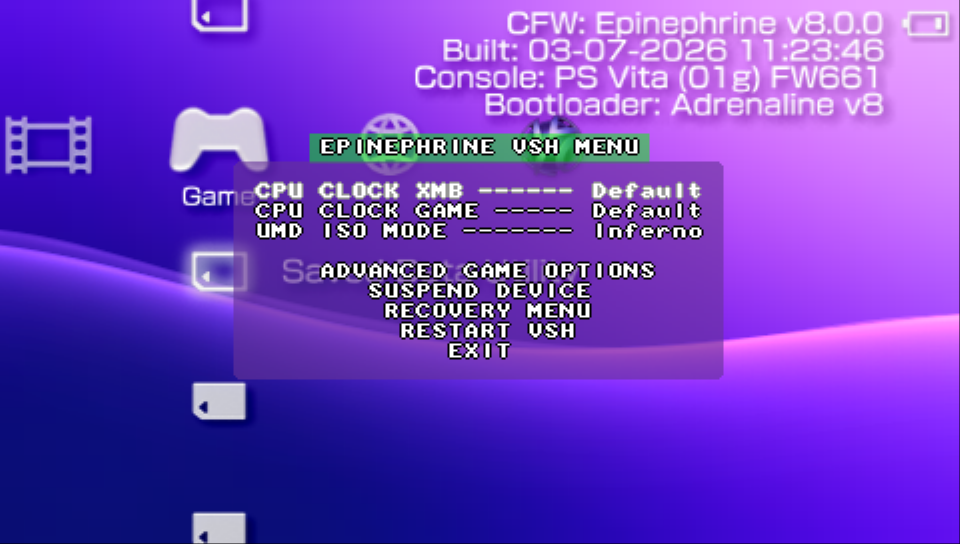
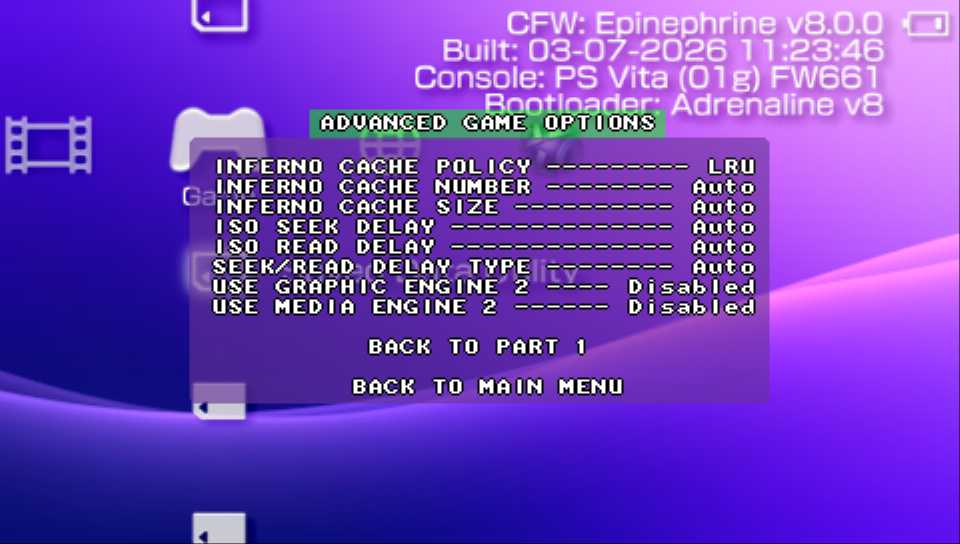
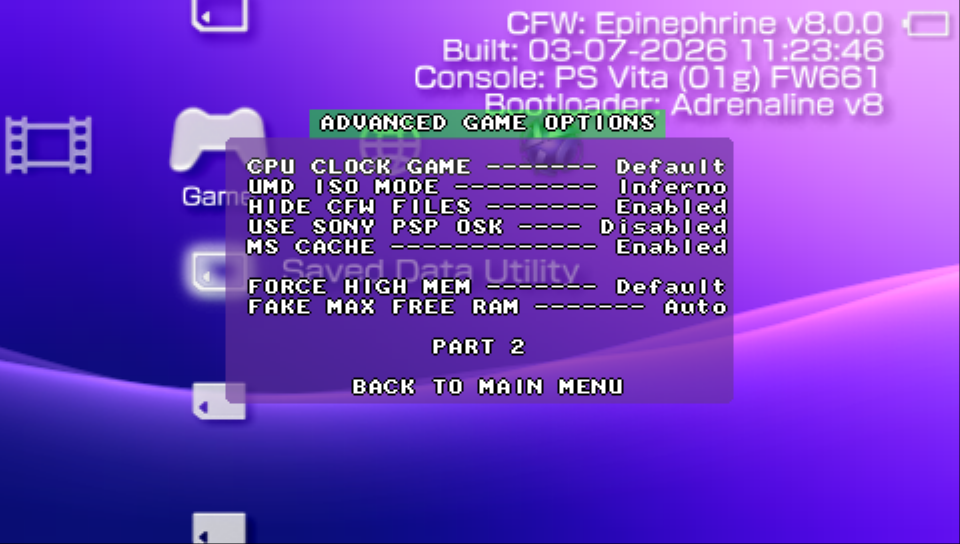
The Classic is more basic, but nostalgic-looking implementation. It has less features but good enough for day-to-day.
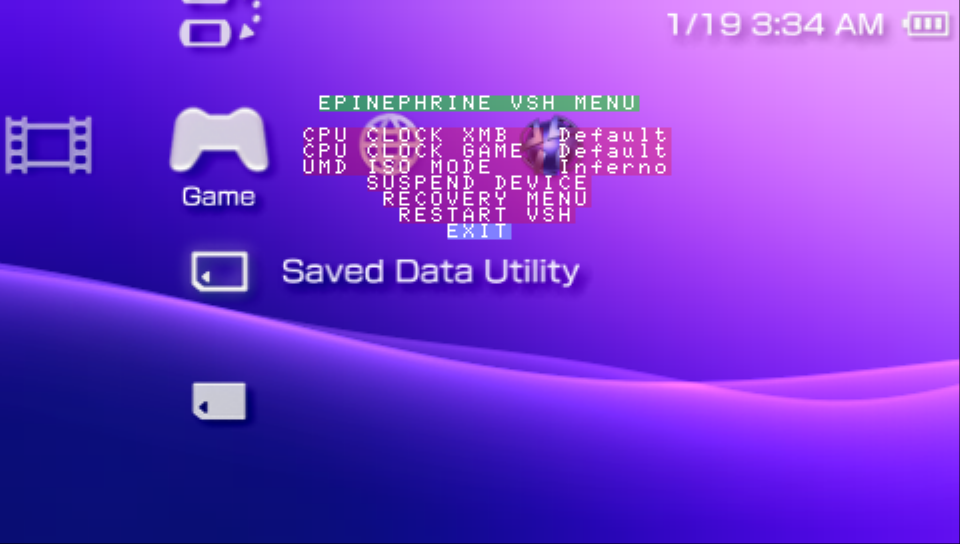
Available common features
- Modify the CPU/BUS speed for the XMB/VSH
- Modify the CPU/BUS speed for PSP Games
- Modify the ISO driver to use when launching ISO games
- Quick option to suspend the device
- Quick option to restart the system in the Recovery Menu
- Quick option to restart XMB/VSH
Modern-specific
- Considers the assigned enter button for the inputs
- Quick advanced game options to help test configuration for not-working titles
Epinephrine Custom Firmware Settings
Epinephrine CFW has several settings options that modify the behavior of the system. The settings can be split in two categories: General Settings and Advanced Settings.
You can use the XMB or the Recovery Menu to easily modify the CFW settings.
caution
Not to be confused with Adrenaline Application Settings, which is another thing.
General Settings
CPU/BUS clock speed in XMB
Configures the CPU/BUS clock speed on when the system is on the XMB/VSH.
Options:
Default: Same as222/111option20/1075/37100/50133/66222/111266/133300/150333/166
CPU/BUS clock speed in PSP game/app
Configures the CPU/BUS clock speed on when the system is running a PSP game, PSP app or PSP homebrew.
Options:
Default: Game/app dependant20/1075/37100/50133/66222/111266/133300/150333/166
UMDemu ISO driver
Configures the UMDemu driver to use with ISO and Compressed ISO games.
Options:
InfernoMarch33Minimal EditionSony NP9660
Skip Sony logo on coldboot
When enabled, skip the “Sony Computer Entertainment” logo when starting the system.
Skip Sony logo on gameboot
When enabled, skip the “PSP” logo when starting an PSP game/app.
Hide corrupt icons in game menu
When enabled, hides corrupt icons in the game menu.
Corrupt icons happens in the case a game folder does not contain an EBOOT.PBP file.
Hide DLCs in game menu
When enabled, hides DLC from showing up as duplicate games when you have DLC installed for your ISO game.
Hide PIC0/PIC1 in game menu
Controls whether to stops displaying PIC0 and/or PIC1 images on XMB, allowing quicker response time to show the game list.
Options:
Disabled: Do not hide PIC0 and PIC1Both: Hides both PIC0 and PIC1PIC0 Only: Hides only the PIC0 (“Title/Information image”)PIC1 Only: Hides only the PIC1 (“Background image”)
Hide MAC address
When enabled, hides the MAC address from the Settings > System Settings > System Information.
Hide CFW files in PSP games
When enabled, hides the CFW files from being seem or modified by PSP games.
This is not applied to homebrew games/apps or custom updater, even if the option is enabled.
caution
This option does affect signed homebrew games/apps (homebrew signed to work on PSP OFW) as signed homebrew is launched in the same way as an official PSP game.
For this reason, if you have a homebrew software that only comes signed and it needs to access CFW files, you can disable this option.
Autorun /PSP/GAME/BOOT/EBOOT.PBP
When enabled, the system automatically launches the game/app int the ???0:/pspemu/PSP/GAME/BOOT/EBOOT.PBP.
Fake VSH Region
Modifies the perceived region on XMB/VSH, allowing to unlock region-specific apps and features.
Options:
DisabledJapanAmericaEuropeKoreaUnited KingdomMexicoAustralia/NZEastTaiwanRussiaChinaDebug Type IDebug Type II
Extended screen colors mode
Modifies the system to use a extended color space based on the configuration.
Options:
Disabled02g: Use the same color space as the PSP-2000. More vibrant colors, cooler color tone.03g: Use the same color space as the PSP-3000. More vibrant colors, warmer color tone.
Use Sony PSP OSK
When enabled, makes the system to use the PSP On Screen Keyboard (OSK) instead of the VITA/PSTV native OSK.
Memory Stick Cache
When enabled, the system will use a cache in I/O operations of the Memory Stick drive (ms0:) to improve speed.
NoDRM engine
Controls whether to patch the DRM engine of the PSP system.
When enabled, the system will allow to launch application, homebrews and games without a valid license.
XMB CFW Settings
Controls whether to load the extra CFW menus on XMB/VSH.
When enabled, the menus will show up in the XMB in the Settings section.
VSH Menu
Controls what VSH Menu implementation to use.
Options:
Modern: A new implementation, GPU rendered version of the menu.Classic: The classic implementation.
Recovery color
Configures the color of the Recovery Menu.
Advanced Settings
Advanced settings are called that for a reason. They provide powerful options that can significantly alter system behavior, stability, or compatibility. These settings are intended for experienced users and tinkerers exploring the best set of configuration for cases of bad compatibility with apps and games (anti-CFW checks, slowdowns not solved by general settings, etc).
Incorrect configuration may lead to unexpected issues, so proceed with caution and consult documentation or community resources if unsure.
tip
On the XMB CFW menu, advanced settings are marked with the ▲ symbol.
High memory layout
Controls whether to force the unlock extra RAM space for the user-space RAM partition, that can be used by games and apps.
Options:
Default: With this option, no specific memory layout is forced.- By default, user RAM partition gets the standard 24MB.
- Homebrew games/apps can request other layout by using the
MEMSIZEin theirSFOinformation or by using the CFW API. - Plugin author can use the CFW API to request changing the layout.
Force Stable: The stable amount of extra RAM is made available to the user RAM partition, a total of 40MB.- When this options is set, it truly forces it, any requests to modify it will result in it being “ignored” (the CFW API returns an error informing that is not possible to modify the memory layout).
Force Max: Makes the maximum possible of RAM available to the user RAM partition, a total of 52MB, at the cost of potential instabilities.- When this options is set, it truly forces it, any requests to modify it will result in it being “ignored” (the CFW API returns an error informing that is not possible to modify the memory layout).
Force Disabled: This option forces the the system to always have the same memory layout as the unmodified PSP firmware.- This means the
MEMSIZEoption in homebrewSFOwill be ignored - CFW API to request changes to memory layout will always fail.
- This means the
max option warning
Some important stuff for the VITA’s PSPemu are put in this region of memory. Although Epinephrine protects the sub-region that was already identified, those last 16MB region usage was not yet completely investigated and reversed. That means that some system instabilities may occur once things start to be allocated on this region.
tip
Homebrew developers can use the Force Disabled to test with more certainty if the homebrew will work on PSP 1000 models when testing on real 1000 model is not possible.
Fake max free memory
Controls wether to limit the reported maximum free memory and how much to limit from sceKernelMaxFreeMemSize on a title.
Any option other than Auto will always use that value, regardless of existent game patches and fixes.
Options:
Auto: Disabled by default, but also can change based on automatic game patches and fixes (often related to high memory layout instabilities)16MB: Set the maximum value to 16MB24MB: Set the maximum value to 24MB (Maximum User RAM)32MB: Set the maximum value to 32MB (Max Kernel + Max User RAM)40MB: Set the maximum value to 40MB (Max Stable high memory layout User RAM)48MB: Set the maximum value to 48MB (Max Kernel + Max Stable high memory layout User RAM)52MB: Set the maximum value to 52MB (Max “Max” high memory layout User RAM)60MB: Set the maximum value to 60MB (Max Kernel + Max “Max” high memory layout User RAM)64MB: Set the maximum value to 64MB (Max PSP RAM, probably not very useful)
warning
This option is very unstable on non-Auto values, i.e. it can easily break many titles with both low and high values.
This options is made available to facilitate exploratory tests with games that breaks with high memory layout or similar issues.
caution
Some games may require more specific values to make then stable on high memory layout (e.g. Rainbow Six: Vegas). In case none of the options helps with crashes, create/open/upvote an issue on the project issue tracer (but also check first to avoid opening duplicated issue tracker).
PSP game/app plugin RAM Partition
Controls in what RAM partition userland plugins are loaded in PSP game/apps.
Options:
Try Extra RAM: Attempts to load the userland plugin on the extra RAM partition, if that fails, attempts to load the plugin on the game RAM partition.- It makes plugins not use the game memory, avoiding game crashes with out-of-memory exception when loading too many userland plugins or plugins too greedy with memory.
- If Force high memory layout is enabled, this options will effectively work like
Game RAMoption.
Game RAM: Always attempts to load the userland plugin on the game RAM partition. This is the classical behavior.
tip
If a plugin is not loading with the Try Extra RAM and you already checked plugin configuration file, you can try to change this option to Game RAM and test it out.
warning
The Try Extra RAM options allows to the system to load way more userland plugins than the classical way, because the extra RAM partition is not used by anything in the system (unless with Force high memory layout, that integrates the extra RAM to game/user RAM partition) and doesn’t get in the way of the memory used by games/apps.
For that reason, if you need to change to the Game RAM option, it is recommended to disable unnecessary PSP game plugins.
Use Graphic Engine 2
Controls wether to load an alternative implementation of the Graphic Engine module, i.e. loads ge_2.prx instead of ge.prx.
This is a CFW option made available to tinkerers to explore possible improvement options for apps/games (considering that native PSPemu has similar options for compatibility with officially released PSP titles on VITA). But it is also an advanced option as it may also cause regressions and/or issues with apps/games.
note
The modules being called “2” doesn’t mean it is a improved version, but rather a poorly named alternative version to be used as compatibility fixer for a small number of officially released titles.
So it is a direct effect of a bad naming because programmers (usually with tight deadlines) are bad at naming things that are very similar in functionality with another existing thing, more so in a thing that is not supposed to be known by end-users… Been there, done that LOL.
note 2
This option does not affect the XMB/VSH. Even if this option is enabled, the XMB/VSH will be loaded with the usual implementation of the Graphic Engine module.
Use Media Engine 2
Controls wether to load an alternative implementation of the Media Engine module, i.e. loads kermit_me_wrapper_2.prx instead of kermit_me_wrapper.prx.
This is a CFW option made available to tinkerers to explore possible improvement options for apps/games (considering that native PSPemu has similar options for compatibility with officially released PSP titles on VITA). But it is also an advanced option as it may also cause regressions and/or issues with apps/games.
note
The modules being called “2” doesn’t mean it is a improved version, but rather a poorly named alternative version to be used as compatibility fixer for a small number of officially released titles.
So it is a direct effect of a bad naming because programmers (usually with tight deadlines) are bad at naming things that are very similar in functionality with another existing thing, more so in a thing that is not supposed to be known by end-users… Been there, done that LOL.
note 2
This option does not affect the XMB/VSH. Even if this option is enabled, the XMB/VSH will be loaded with the usual implementation of the Media Engine module.
Execute BOOT.BIN in UMDemu ISO
This configuration makes the the system to execute BOOT.BIN file instead of EBOOT.BIN when launching ISO game/apps.
In the case of the ISO game/apps not having a BOOT.BIN file, it will fallback to EBOOT.BIN.
warning
Enabling this configuration will make many games that have invalid BOOT.BIN file to not run (black screen, exit with error, or even PSPemu crash).
An better alternative is to launch know apps that need to execute BOOT.BIN to work (mostly ISO of demos, prototypes, and modded games) holding the R button. That will cause to execute BOOT.BIN without changing the configuration and not affecting all the ISO game/apps you have.
Inferno ISO cache policy
Configures what cache policy the Inferno UMDemu driver will use for its overall cache (also known as Inferno Cache).
Options:
LRU: Least Recently Used policy. Uses less cpu cycles because it will discards the cache slot from the queue that have not been used in a timeframe when new cache item needs to be added.RR: Random Replacement policy. Uses slightly less memory as it doesn’t need to keep track of data related to cache slots usage. It can be beneficial for uniform or streaming reading patterns.
warning
If you didn’t understood the brief explanation, do not change this setting. The default setting (LRU) is already the better option for games in general.
Inferno ISO cache number
Configures how many caches the Inferno UMDemu driver will use for Inferno Cache.
This could improve the execution of a game/app at the cost of using more memory.
Any option other than Auto will always use that value for all ISO games and apps launched with the Inferno driver.
Options:
Auto: Uses the default value32, but also can change based on automatic game patches and fixes, including totally disabling Inferno Cache.1248163264128
Inferno ISO cache size
Configures the size of cache the Inferno UMDemu driver will use for Inferno Cache.
This also could improve the execution of a game/app at the cost of using more memory.
Any option other than Auto will always use that value for all ISO games and apps launched with the Inferno driver.
Options:
Auto: Uses the default value32KB, but also can change based on automatic game patches and fixes, including totally disabling Inferno Cache.1KB2KB4KB8KB16KB32KB64KB
warning
Putting the biggest values for Inferno ISO cache number and Inferno ISO cache size will use half of the stable extra RAM (8MB).
Even though what is left is more than enough for most plugin configurations, if you have a crazy amounts of plugins that uses a lots of memory, memory starvation will happen.
UMDemu ISO seek time delay factor
Epinephrine’s UMDemu drivers have the ability to simulate the seek time for the disc reader reach to an disc offset before reading and retrieving data that would happen when reading a physical UMD.
This setting allows to control a factor of how much slower is that seek time simulation.
This can be used to bypass the anti-CFW checks in some games and fix desynchronization issues on some other games. Epinephrine automatically sets for games known to have those checks and/or desync issues when both seek and read time are set to Auto.
Option:
Auto: Disabled by default, but also can change based on automatic game patches and fixes. IfUMDemu ISO read speed delay factoris different thanAuto, it is interpreted as0x(i.e. no seek time delays).1x2x3x4x
warning
Do not forget to re-set to Auto before launching a ISO game/app that do not need this configured to avoid performance penalties on games that do not need it.
UMDemu ISO read speed delay factor
Epinephrine’s UMDemu drivers have the ability to simulate the slower read speed of a physical UMD.
This setting allows to control a factor of how much slower is that read speed simulation.
This can be used to bypass the anti-CFW checks in some games and fix desynchronization issues on some other games. Epinephrine automatically sets for games known to have those checks and/or desyc issues when both seek and read time are set to Auto.
Option:
Auto: Disabled by default, but also can change based on automatic game patches and fixes. IfUMDemu ISO seek speed delay factoris different thanAuto, it is interpreted as0x(i.e. no read time delays).1x2x3x4x
warning
Do not forget to re-set to Auto before launching a ISO game/app that do not need this configured to avoid performance issues.
warning
When using the Inferno driver, setting any of the UMDemu ISO seek time delay factor and the UMDemu ISO read speed delay factor settings to any value other than Auto will consequently disable the Inferno Cache feature of the driver.
This can reduce greatly the performance of executing ISO games/apps that do not need them configured if you forget to return them to Auto.
UMDemu ISO seek/read delay strategy
Controls the strategy for the physical UMD seek/read delays simulations.
Option:
Auto: Disabled by default, but also can change based on automatic game patches and fixes.Per FD: The delays occurs per file descriptorGlobal: The delays occurs for every ready of any file descriptor
TTY redirection
Controls whether to redirect TTY stdout to VITA-side.
If enabled, the stdout of the vPSP-side is redirected to the VITA-side. There, they can be used for remote logging (CatLog and similar homebrews), for example.
caution
When enabled, you may find regression on game or homebrew performance if they do excessive outputs to the stdout (usually for debug).
CFW modules can also do excessive outputs to stdout when compiled with higher DEBUG levels, and that also can affect title performance.
XMB plugins
Controls whether to load plugins on XMB/VSH.
GAME plugins
Controls whether to load plugins on PSP game/apps.
POPS plugins
Controls whether to load plugins on PS1 game/apps.
Epinephrine Recovery Menu
The Epinephrine Recover Menu allows the user to modify the Epinephrine CFW Settings, work as a plugin manager and extra features.
There are two ways to enter in the Recovery Menu. Either on XMB, by opening the VSH Menu and selecting the RECOVERY MENU option, or opening the Adrenaline Application while holding the R button.
The Recovery Menu has three sections: General, Advanced and Plugin.
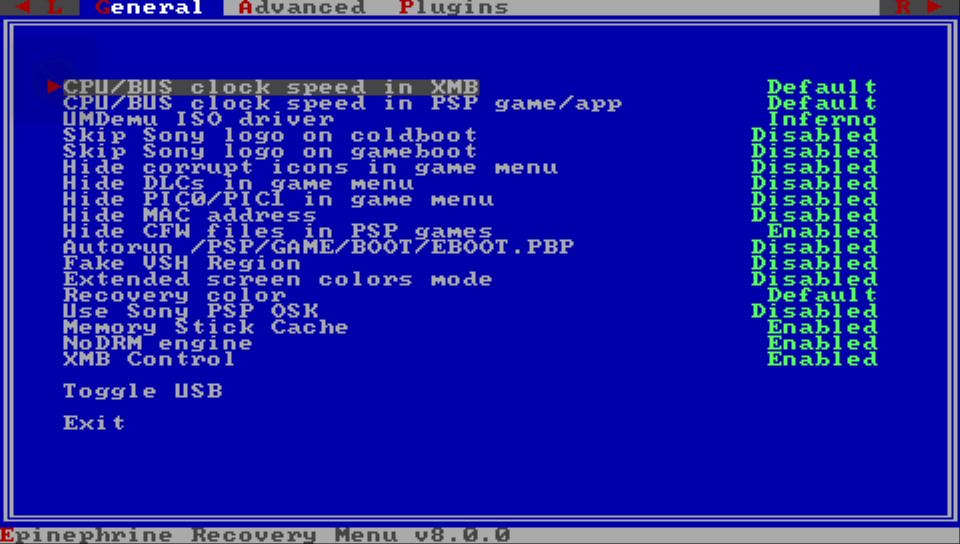
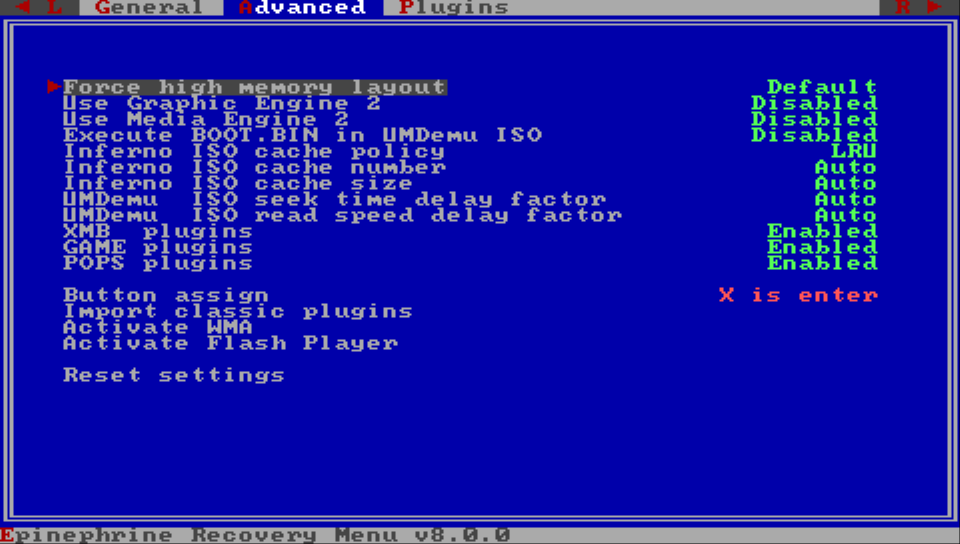
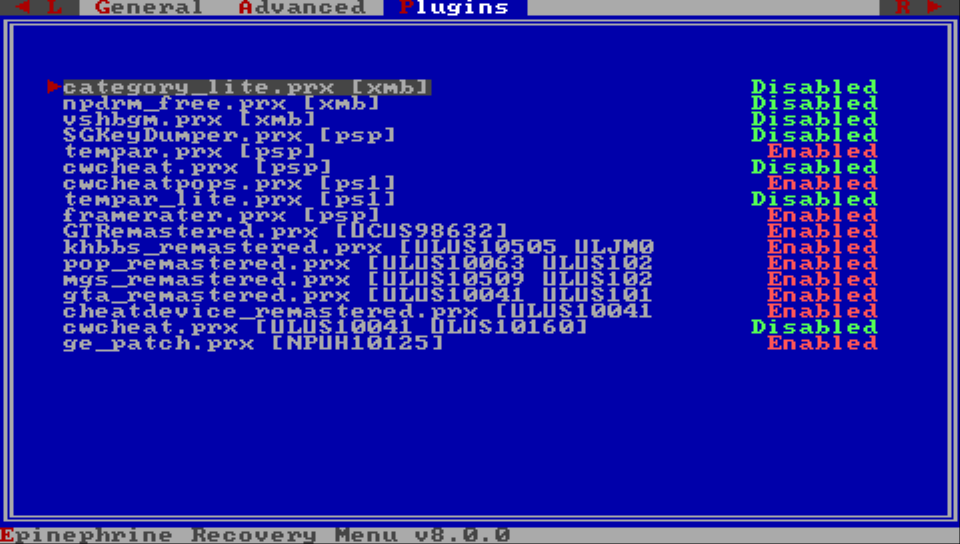
General
This section is more focused on the General CFW Settings. But it contains a couple of extra itens detailed bellow.
Toggle USB
Switch the state of USB connection while on Recovery Mode.
Exit
Exit the Recovery Menu and restart the vPSP system.
Advanced
This section is more focused on the Advanced CFW Settings. But it contains a few extra itens detailed bellow.
Button assign
Configures what button is used for confirmation/enter system-wide.
Options:
⭕️ is enter❌ is enter
Import classic plugins
Imports the classic plugin configuration (/seplugins/vsh.txt, /seplugins/game.txt, /seplugins/pops.txt) to the new format at ???0:/pspemu/seplugins/plugins.txt.
warning
If you already have a ???0:/pspemu/seplugins/plugins.txt file, it will be overwritten by this action.
Activate WMA
Enables WMA playback without connecting to the internet.
Activate Flash Player
Enables Flash Player without connecting to the internet.
Reset settings
Resets the CFW settings to the default values.
Plugins
This is the Recovery Menu plugin manager. Here you can select a plugin and change its value to Disabled or Enabled.
XMB CFW Menus
Epinephrine adds extra menus to the XMB that allow the user to change CFW settings and work as a plugin manager.
★ Epinephrine CFW settings
This menu can be found in the Settings section of the XMB. It allows modifying the Epinephrine CFW Settings.
Some options may require that the system be restarted before taking effect. This will be informed in the menu (third image).
Advanced settings are marked with the ▲ symbol at the start.
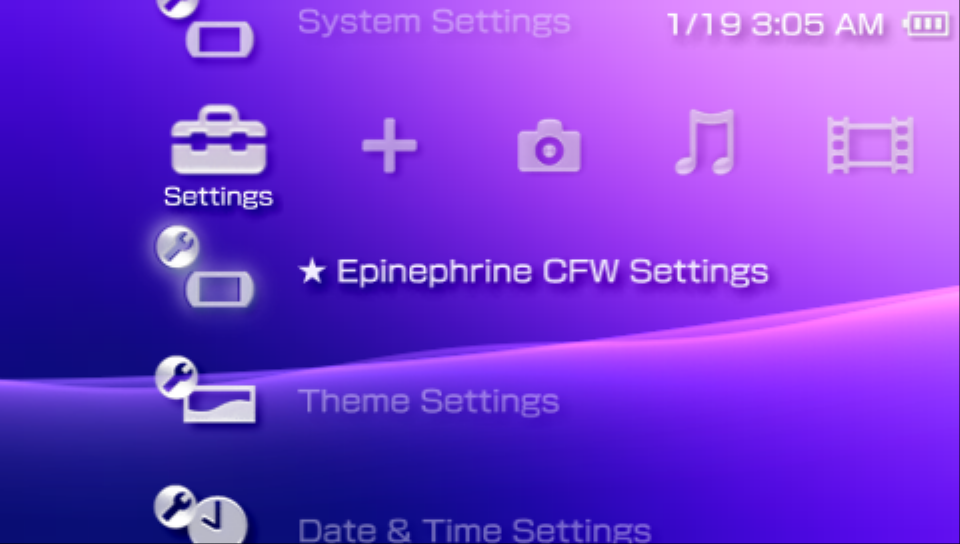
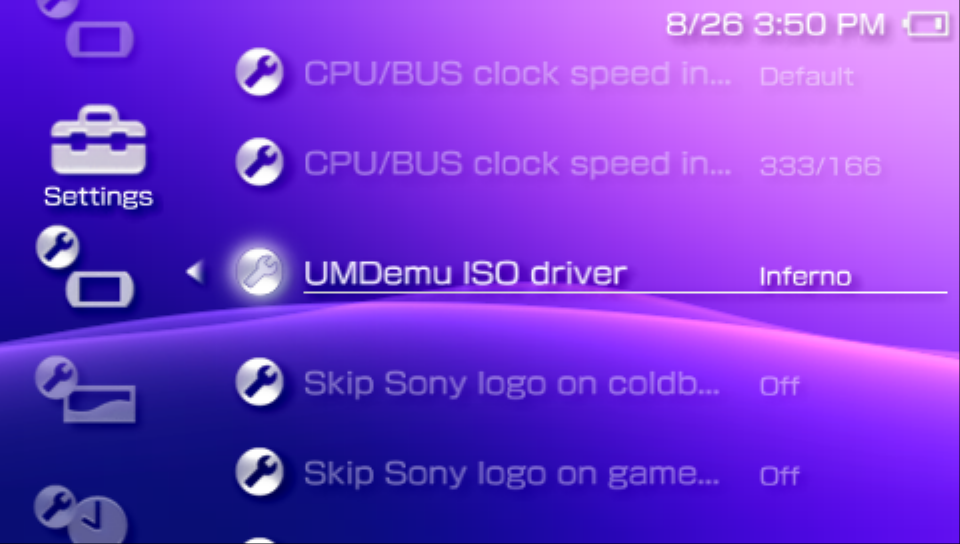
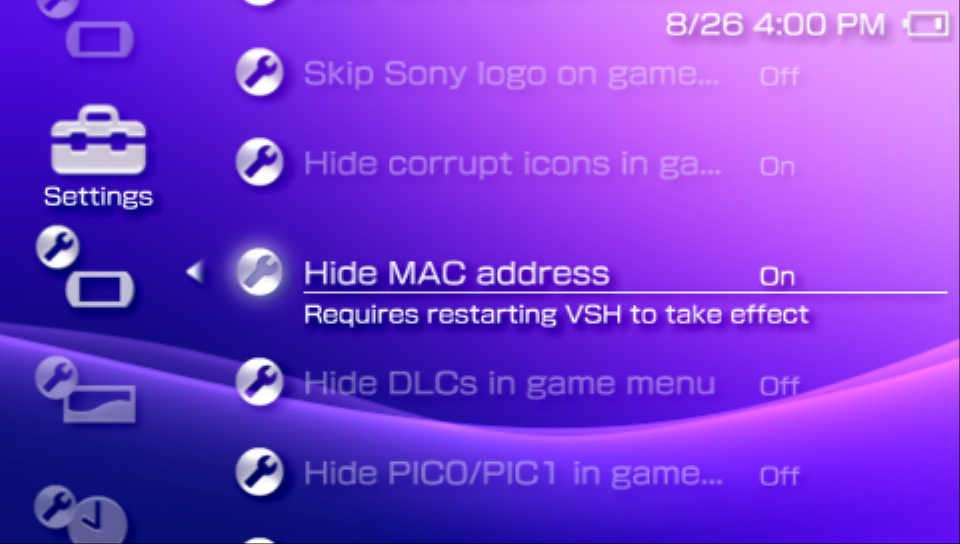
★ Plugins Manager
This menu can be found in the Settings section of the XMB. It allows modifying the plugin configuration directly from the XMB.
Once opened, it will show the list of plugins, their runlevels, and their path. Clicking the enter button allows to select the state of the plugin entry (On, Off, Remove).
The Remove option will remove the configuration line related to the plugin configuration file and restart the XMB.
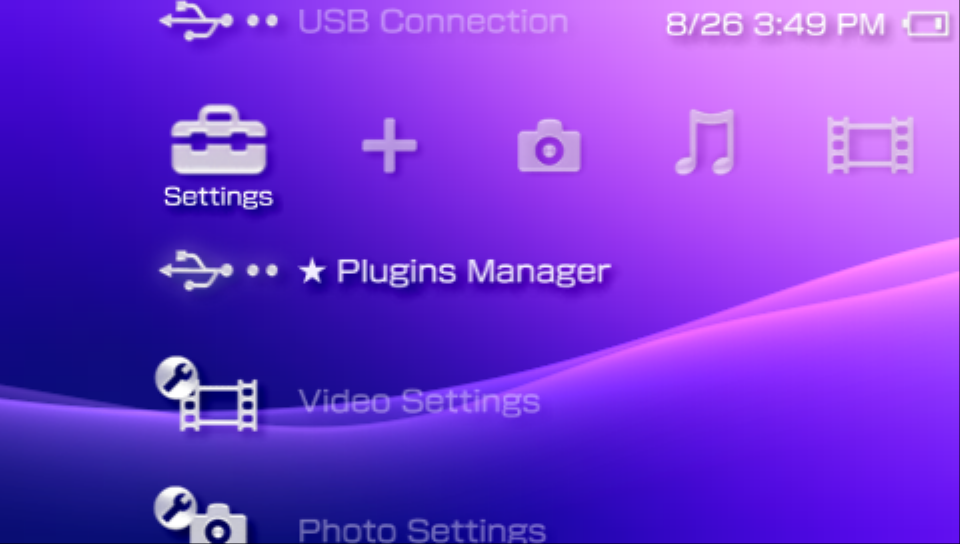
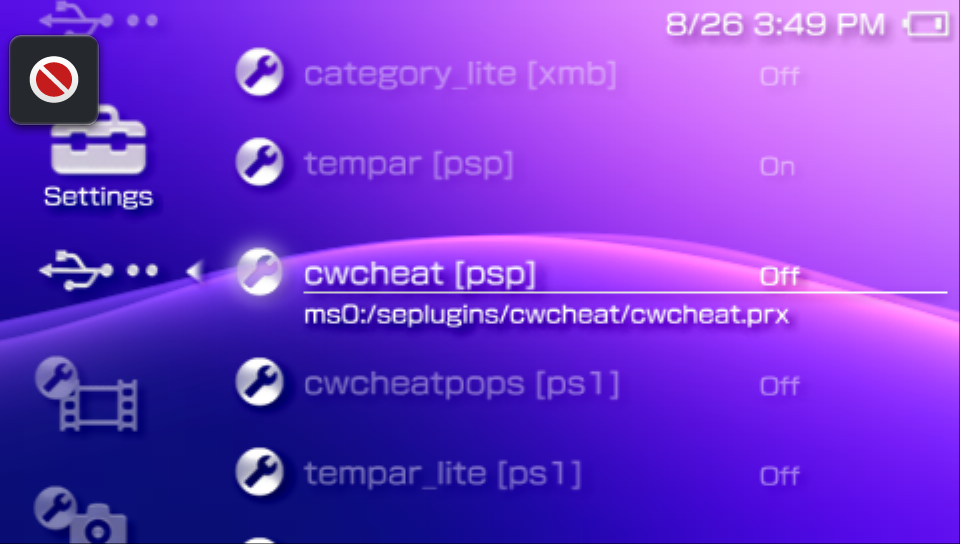
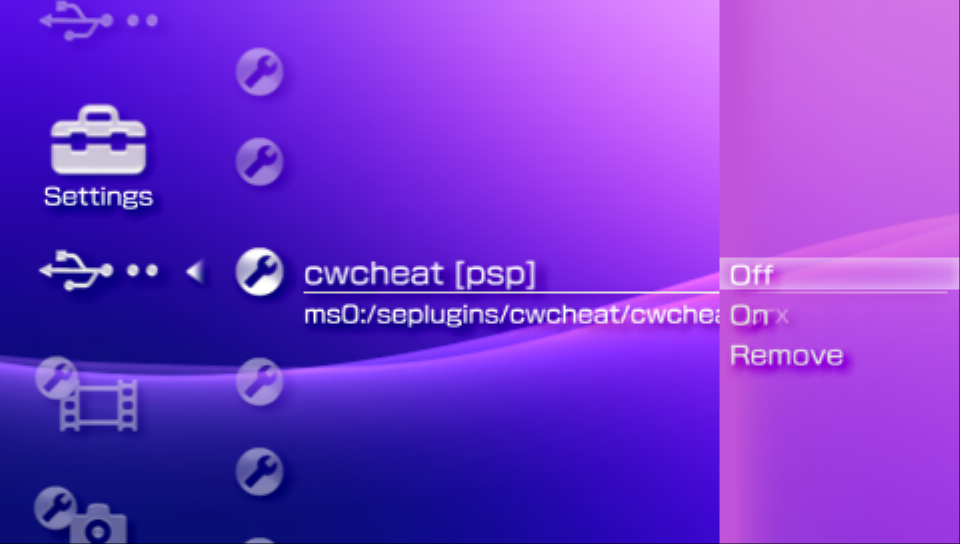
Contributing to Adrenaline
Contribution to the project is always welcome. The process is straight-forward:
- Create a fork of the project on GitHub
- Commit your changes (remember to do good commit messages)
- Send a Pull Request (PR) to the project
This is the gist of it, but you will need to be able to compile the project to test before sending a PR.
Project parts overview
Adrenaline Application (a.k.a. VITA-side)
bubble: The bubble launcher for Adrenalineuser: The userspace plugin that patches the PSPemu and allows extra communication between the VITA-side with the PSP-sidekernel: The kernel plugin that do the necessary patches to fix the double launch bugusbdevice: The USB mass storage pluginvsh: The plugin that patches VITA VSH for Adrenaline
Epinephrine eCFW (a.k.a. ePSP-side)
The Epinephrine eCFW part can be separated in two parts: The core parts and the extra parts.
The core parts are essential to support the most basic functionality of a CFW. The extra parts are not necessary for the CFW, but might provide quality of life features for end-users.
Core parts:
cef/core/systemctrl: The heart of the eCFW, therefore it’s nameSystemControl. It provide patches for unsigned code execution, handles anti-CFW protection in games, and provides extra libraries API that serves the rest of the eCFW modules and third-party plugins.cef/core/pentazemin: ThePentazeminmodule patches the necessary system modules and old homebrew modules to make the vPSP environment to work. It also works as a compatibility layer for other PSP CFW to run on Adrenaline more easily (like ARK).cef/core/vshctrl: TheVshControlmodule handles the main patches for theXMB/VSHto allow launching unsigned applications from the XMB. It also provides extra API for plugins meant to be run onXMB/VSHcontexts.cef/core/popcorn: ThePopcornManagermodule allows the PS1 emulator (POPS) to launch custom PS1 images.cef/core/recovery: TheRecovery Menumodule. It provides the Recovery Menu, that can be used to configure the eCFW, or reset it in case of bad configuration/plugins making the system not boot-up correctly.cef/core/kermit_idstorage: A custom implementation ofsceIdStorage_driverthat enables the vPSP environment to work properly.cef/core/payloadexandcef/core/rebootex: Handles the actual injection of the CFW in the (re)boot process.Payloadexis used byuserto launch EPI CFW, whileRebootexis set to relaunch it during a ePSP reboot.cef/core/payloadex_ark: Handles the actual injection of the CFW in the boot process.Payloadex_ARKis used byuserto launch ARK CFW.cef/extra/xmbctrl: TheXMB Controlmodule provides access to CFW configuration and plugin management directly from the XMBSettingssection and the required API to use GU in XMB/VSH.cef/iso_drivers/galaxy: TheGalaxyControllermodule provide patches to use ISO and Compressed ISO with the Sony’s NP9660 driver.cef/iso_drivers/inferno: TheInfernoDrivermodule is the custom driver that allows executing ISO and Compressed ISO.cef/iso_drivers/march33: TheMarch33Drivermodule is the custom driver that allows executing ISO and Compressed ISO.cef/iso_drivers/minimal_edition: TheMEisoDrivermodule is the custom driver that allows executing ISO and Compressed ISO.
Extra Parts:
cef/extra/satelite: Provides theVSH Menuto the eCFW, allowing to quick access the most basic configurations in any place of the XMB.cef/extra/updater: theUPDATERapplication that allows to update Adrenaline and EPI from the vPSP environment.
Setting up the development environment
To be able to build the project, you will need to setup the necessary development environment parts. Adrenaline depends on four thing: VITASDK, PSPSDK, PSP CFW SDK, Python3 and psp-packer.
For the VITASDK and PSPSDK, follow their instructions to install it in your system.
For the PSP CFW SDK, prefer to install from source, as CFW development and updates to the CFW SDK move hand-in-hand. If using CMAKE, it downloads and uses and compiles the latest commit.
Python3 installation will depend on your system and setup. Google is your friend on this one.
For psp-packer, either install via cargo or install from source.
Once everything is installed, you can build the project.
Building the project
First, you need to compile the eCFW (ePSP-side) code:
psp-cmake -S cef -B cef/build
cmake --build cef/build
Then, you have to build the VITA-side part:
cmake -S . -B build -DCMAKE_BUILD_TYPE=Release
cmake --build build
For every change, you must recompile the project for the changes to take effect. This may be obvious for many programmers, but absolute novice in compiled languages may not understand this right away.
grayjack comment
I do not recommend to start in a project as complex as this one. Going through the complexity ladder with small steps is statistically a better way to learn.
That being said, over 10 years ago, I started with baremetal software on the 3DS. I had many frustrations as a novice, but I end up just fine. So if you absolutely want to start with Adrenaline, who am I to stop you.
tip
If you did not change a thing on the cef directory, you don’t need to recompile the Epinephrine eCFW.
Manually testing the project
After building the project, you have to install it. For that you can follow the manual update instructions.
You need to reboot the system if there was any modifications on the vsh or kernel code.
Test things your code change affect.
Logs
On the ePSP-side, you can pass next the definition to the cmake call that enables logging on the subprojects that form the Adrenaline ePSP CFW. The ones available are:
SYSTEMCTRL_DEBUG: Enables logs only on thecef/core/systemctrlmodulePENTAZEMIN_DEBUG: enables logs only on thecef/core/pentazeminmoduleRECOVERY_DEBUG: Enables logs only on thecef/core/recoverymodulePOPCORN_DEBUG: Enables logs only on thecef/core/popcornmoduleVSHCTRL_DEBUG: Enables logs only on thecef/core/vshctrlmoduleKERMIT_IDSTORAGE_DEBUG: Enables logs only on thecef/core/kermit_idstoragemoduleGALAXY_DEBUG: Enables logs only on thecef/iso_drivers/galaxymoduleINFERNO_DEBUG: Enables logs only on thecef/iso_drivers/infernomoduleMARCH33_DEBUG: Enables logs only on thecef/iso_drivers/march33moduleMINIMAL_EDITION_DEBUG: Enables logs only on thecef/iso_drivers/minimal_editionmoduleXMBCTRL_DEBUG: Enables logs only on thecef/extra/xmbctrlmoduleSATELITE_DEBUG: Enables logs only on thecef/extra/satelitemoduleDEBUG: Enables logs to all subprojects with the same level
It is recommended to use the specific ones. Another recommendation is to avoid using more than level 2 unless really necessary, as the excessive logging message can make the vPSP system very slow.
example
psp-cmake -S cef -B cef/build -DSYSTEMCTRL_DEBUG=2 -DPENTAZEMIN_DEBUG=1
On the VITA-side, we don’t have something super well stablished, you can use sceClibPrintf function, and the messages will show up in the tty, that you can access through log homebrews (we recommend catlog).
Accessing the logs
You can access in real-time and in your computer all logs by using logs homebrew such as catlog. This is the easiest way to access them.
For eCFW modules to show logs on real-time you have to enable the TTY redirection setting.
For the eCFW modules, you can later access them by looking into log files at the ???0:/pspemu/ directory. They are all named using the following pattern: log_⟨MODULE_NAME⟩.txt.
Using CFW API in your homebrew
Epinephrine CFW offers five libraries that can be used by homebrew software: SystemCtrlForKernel, SystemCtrlForUser, KUBridge, SysclibForUser, and VshCtrlLib.
The SystemCtrlForKernel and SystemCtrlForUser contain API that allows the user to launch/execute homebrew and games, get and set system information, live patching utilities, and more. It is available in all possible runlevels, but, as the names suggest, SystemCtrlForKernel is only available for kernel plugins, while SystemCtrlForUser is available for user plugins and homebrew applications.
The KUBridge provides APIs to execute functions with kernel access from the user-space. It is also available in all possible runlevels, and as SystemCtrlForUser, it is available for user plugins and homebrew applications.
The SysclibForUser provides many basic C library API to the user-space. With it, you can avoid linking to the newlibc implementation of those functions, making your executable smaller. It is available in all possible runlevels for user plugins and homebrew applications.
The VshCtrlLib extends the API available on the VSH/XMB runlevel; this also means it is only available on that runlevel. It is available for user plugins.
How to use them in your project
To start using these APIs, you can install the PSP CFW SDK to obtain the headers and the stubs for the CFW API.
The easiest way is to use psp-pacman:
psp-pacman -Syy psp-cfw-sdk
You can also install it from source, by cloning the git repo linked above, and executing
make install
warning
PSPDEV toolchain must be properly set for it to work.
My homebrew already uses CFW APIs
In the case of your homebrew already using CFW APIs, there is a very good chance that you won’t need to modify a thing to support Epinephrine.
The Epinephrine’s SystemCtrlForUser and KUBridge have 100% API compatibility with the same libraries of M33, ME, PRO, and ARK custom firmwares. That means that if the API provided by the original targeted CFW is sufficient for your project, you won’t need to change the stubs and header and create a build only targeted to Epinephrine.
The Epinephrine’s SystemCtrlForKernel is mostly compatible with M33, ME, PRO, and ARK custom firmwares. Make sure that any function you use from this library also exists for Epinephrine. If you couldn’t find any, at worst, you will need to rebuild your kernel plugin project for the 6.61 PSP firmware version to support Epinephrine.
The Epinephrine’s SysclibForUser only exists on Epinephrine and ARK, and they have total parity. If you already use it, you don’t need to change.
The Epinephrine’s VshCtrlLib is 100% compatible with M33, and mostly compatible with ME, PRO, and ARK custom firmwares. Make sure that any function you use from this library also exists for Epinephrine. If you couldn’t find any, you don’t need to change a thing to support Epinephrine.
Glossary
| Abbreviated | Full Names |
|---|---|
| EPI | Abbreviation of Epinephrine CFW |
| CFW | Custom Firmware |
| HEN | Homebrew Enabler |
| CL | Custom Launcher |
| IPL | Initial Program Loader |
| PSPemu | PlayStation Portable Emulator (PS Vita). Uses real PSP hardware for CPU and GPU, with peripherals being HLE. |
| UMDemu | Universal Media Disc Emulator |
| CEF (eCFW) | Custom Firmware for Vita’s pspemu |
| ePSP | PS Vita’s stock pspemu in PSP mode. |
| ePSX | PS Vita’s stock pspemu in PS1 mode. Uses a modified version of POPS running on the Vita’s built-in PSP hardware, with sound emulation and screen upscaling handled by the native Vita hardware/software. It uses the same PSPemu as ePSP, with a flag that changes its behavior when playing PS1 games. |
| vPSP | Adrenaline-patched pspemu with mixed PSP/PS1 mode. The Adrenaline patches make it behave more similarly to a real PSP, hence a true Virtual PSP. |
| POPS | PlayStation One Portable Station (PS1 emulator for PSP) |
| VitaPOPS | A modified version of POPS for the PS Vita. It is largely based on 6.60 with several changes, mainly related to sound emulation, now handled by the Vita itself since ePSP lacks the Media Engine coprocessor used by POPS on PSP to emulate sound. |
| UMD | Universal Media Disc |
| FTP | File Transfer Protocol |
| XMB | Xross Media Bar |
| VSH | Visual SHell |
| RIF | Rights Information Files |
| QCMA | Qt Content Manager Assistant |
| ???0 | Question marks could mean ux, ur, uma, imc, or xmc, depending on the Memory Stick Location configuration. |
| ms0 | Standard PSP Memory Stick drive. |
| ef0 | PSP-Go Internal Memory Card drive. |
| ux0 | Standard PS Vita Memory Stick drive. |
Known Compatibility Issues
This is a list of compatibility issues on Epinephrine with games, application, homebrews and plugins.
EyePet
The camera is not working in this game. That seems to be caused by some buffer in PSPemu that somehow gets invalid.
There are currently no way to solve the issue with this game.
Titles that ISO need to use BOOT.BIN
Titles in the ISO/Compressed ISO format that are decrypted or are demo, prototype or modded version of a game will need to be launched while holding the R trigger, otherwise the game won’t launch properly or crash the system.
Games with Network issues (requires re-testing)
Hang when trying to get to the AP connection screen
Twisted Metal Head OnNBAATV Blazin Fury
Others
Games that use GameMode API - partial list of games here.
Burnout Dominator: Game becomes too fast for everyone if a Vita player joins, also happens if one of the PSPs is overclocked (video demonstration here).Lego Indiana Jones 2: Getting a wireless error (Epinephrine) or the game freezes up (ARK).Street Riders/Asphalt: Urban GT 2: Can’t see other consoles in lobby (same developer made both games so its most likely the same issue).CSPSP: Game gets a blue screen/crash when entering multiplayer , note that the game works fine on Epinephrine.Sega Rally Revo: Game disconnects after it starts in infrastructure mode only.
Some network issues may be fixed with the updated PRO Online.
VITA Plugins
Some vita user plugins can cause issues with Adrenaline and Epinephrine (e.g. ThreadOptmizer). For that reason, we recommend you to avoid enabling plugins.
*!PSPEMUCFW
*ALL
ur0:tai/my_awesome_plugins.suprx
Fun Facts and FAQ
Why many things have “EPI” in the name?
“EPI” is the common abbreviation of epinephrine, which is the technical name for the hormone popularly known as adrenaline.
How to get the title ID for an application/game?
You may want to get this information to write your plugins configuration or to report issues.
There are many ways to get this information, but the easiest with Adrenaline is to open the Adrenaline Menu after launching the app/game and look up the information in the Main tab.
example
After opening the game, open Adrenaline Menu in the Main tab and look at the information just below the “Adrenaline Menu” header.
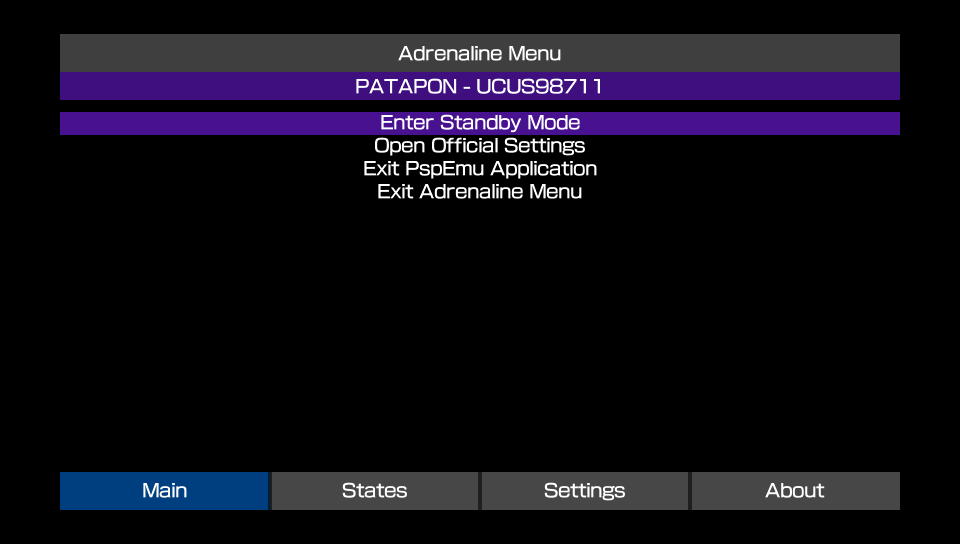
How to contribute/support to the project?
There are a number of ways to contribute to the Adrenaline project for both programmers and non-programmers alike.
- Improving documentation: You can improve the documentation text and information. For that, you need to send a pull request (PR) on the Adrenaline GitHub Repository with the changes in the files at the
docsdirectory. - Code improvements: If you know how to code in
C, you can contribute by sending Pull Requests on the Adrenaline GitHub Repository with your changes. - Game/App/Homebrew incompatibility report: If a game is not working out of the box, you can open an Issue ticket.
- Make sure to disable any known plugins to cause issues with the application before reporting.
- Bug reports: Any bugs found can be reported by opening an Issue ticket.
- Be mindful that some issues are harder to fix than others and that the project is developed in the maintainers spare time as a hobby and may take a while for some issue to be solved.
- Feature ideas: You can suggest a feature to be implemented on Adrenaline by opening an Issue ticket.
- Be mindful that your request may not be possible to be implemented or be considered low priority or even impractical to be implemented.
- Financial support: If you like, you can help the devs with monetary support
- Cat (isage) is currently unable to receive any international money. If you so prefer, a donation to your local animal shelter is encouraged.
- Grayjack can receive support by Github Sponsors or PIX. If neither are possible to you, consider a donation to your local animal shelter.
Is this Adrenaline compatible with Adrenaline Bubble Booter/Manager?
No. That project is a whole modified Adrenaline distribution (and not a plugin as many believe), that means when you install it, you are overwriting your entire Adrenaline installation. That means when you install it, now you have “Adrenaline from Adrenaline Bubble Manager” instead of “Adrenaline from TheFlow” or “Adrenaline from Isage fork” (this one, and the only one that is being maintained).
Although, we been thinking on other solution(s) to the launch Adrenaline with app/game X from the livearea.
Why rename the eCFW part of the project to Epinephrine
Now that the app supports natively loading other eCFW, it felt like making a clearer distinction on what is the Adrenaline (the app that does patches that allow to run CFW on PSPemu) and Adrenaline (the actual eCFW). This distinction always existed, but since they were always distributed together under the same name made the distinction blurrier to the end-user.
The decision on the name was easy, we’ve been using “EPI” as abbreviation for Adrenaline CFW module names and such. And as explained before, EPI is abbreviation on epinephrine, which is just a more technical name for adrenaline. So with that, we can name the two sides of the project while maintaining the meaning the same as it was before and a nice (and geeky) play with words.
How to install/use ARK with Adrenaline?
Part 1 - Getting the ARK files
There is two ways to get the ARK files:
Option 1: FasterARK
- Download and install FasterARK.vpk
- Run it from LiveArea, choose your installation type and proceed
Option 2: Update from ARK-4
- Download ARK.zip from the ARK release page
- Extract the zip file
- Put the
FLASH0.ARKfile in your???0:pspemu/PSP/SAVEDATA/ARK_01234/folder
Part 2 - Setting Adrenaline
- Open Adrenaline
- Open Adrenaline Menu
- Go to the
Settingstab - Change the value of the
vPSP Custom Firmwareoption toARK - Return to the
Maintab and selectExit PspEmu Application - Reopen Adrenaline
Changelog
Unreleased
Adrenaline
- Add support to use files on
ux0:data/PSPEMUCFW/instead ofux0:app/PSPEMUCFW/ - Fix savestate thumbnail on some graphical filters showing as one color plain image
- Fix UTF-8 rendering on Adrenaline Menu
Epinephrine CFW
-
Add option to select PSP game plugin loading behavior [docs]
-
Add option to forcibly disable high memory layout [docs]
-
Fix branch logic for plugins patch
-
Fix formatting issues on recovery
-
Refactor SystemControl and Pentazemin modules to use
sctrlHENSetSystemBootedHandler -
DEV: Introduce
sctrlHENSetSystemBootedHandler- It allows to se a handler that is called only once when the system just finished the boot sequence.
-
DEV: Expand
isoCtrl_driverAPI withisoGetUmdFile,isoReopenUmdFile,isoSwapUmdFile. -
DEV: Introduce
NoDrmHelperCFW library- Although used internally for Epinephrine NoDRM engine, this could also be used to help implement plugins that closes eventual gaps in the NoDRM engine or even a external full implementation of a NoDRM engine.
v8.0.2
Adrenaline
- Fix the PS1 overlay image not processing correctly
Epinephrine CFW
- Fix
Saved Data Utilitynot opening withSystem Storageset to disabled. - Fix XMB Memory Stick item showing zero free space after accessing
Saved Data Utility - Fix plugins failing to load on POPS (PS1 titles)
- Fix crash in opening context menu when
XMB CFW Settingsis disabled - Fix Uncategorized category on Categories Lite showing corrupt icons
- Refactor: Don’t try to load userlevel plugins on extra RAM on POPS
- Refactor: Make fake
TotalFreeMemmore precise - DEV: Fix
gugluelibrary not exported with weak reference support
Updater
- Feature: Upgrade the design of the updater
v8.0.1
Epinephrine CFW
- Fixed
Categories Litenot able to find the categorized ISO files
v8.0.0
Adrenaline
- Add option to select the vPSP Custom Firmware to use [docs]
- Add
Scale2xgraphical filter options [docs] - Add
Scale2x Plusgraphical filter options [docs] - Add
Scale3xgraphical filter options [docs] - Add image overlay filter for PS1 game/apps [docs]
- Add an option to select a System Storage location to expose
ef0:to the chosen CFW. - “Fix” manual double launch on first install
- Improve frame pacing on Original graphics filtering
- Implement hold
Squareto hide Adrenaline Menu on graphics-related settings - Pauses PSP game when Adrenaline Menu is opened
- Implement the ability to hide the Adrenaline Menu to better look at the screen for differences
Epinephrine CFW
-
Breaking change: New plugin configuration format [docs]
- Only one configuration file
/pspemu/seplugins/plugins.txtfor all runlevels - Finer control over when to enable/disable plugins
- Support for plugins in specific games
- Support for plugin only on homebrew apps
- Migration instructions below
- Only one configuration file
-
Update the Inferno Driver to Inferno 2 [docs]
-
Introduce March33 Driver v2: An evolution of the March33 ISO driver [docs]
-
Introduce MinimalEdition Driver v2: An evolution of the ME ISO driver [docs]
-
Introduce an improved implementation of the GalaxyController [docs]
-
Add support for launching
JSO,ZSO,CSOv2, andDAXcompressed ISO formats using any ISO driver. [docs] -
Add support for per-file descriptor UMD seek/read speed emulation to ISO drivers.
-
Implement a GPU-rendered VSH Menu
- The classical version is still available through configuration
-
Add CFW file hider in games.
-
Introduce CFW Settings on the XMB [docs]
-
Introduce Plugin Manager on the XMB [docs]
-
Add support to show the
System Storageon the XMB. -
Improve stability of the
Force High MemoryCFW option. [docs] -
Improve the speed and efficiency of all UMDemu ISO drivers [docs]
-
Add Custom POPS Configuration injection for custom or converted PS1 game/apps [docs]
-
Patch libcrypt for custom or converted PS1 game/apps [docs]
-
Add
Memory Stick Cacheto speedup I/O operations in the Memory Stick drive (ms0) [docs] -
Add
Use Graphic Engine 2andUse Media Engine 2advanced CFW options [docs] -
Add
Fake max free memoryadvanced CFW option [docs] -
Add
Hide CFW files in PSP gamesgeneral CFW option [docs] -
Add
TTY redirectionadvanced CFW option [docs] -
Add support to show app version on XMB info for ISO games
- Support to show the correct version with game updates (
PBOOT.PBP)
- Support to show the correct version with game updates (
-
Implement “Hold L while launching apps” to not load plugins [docs]
-
Implement “Hold R while launching ISO apps/games” to execute
BOOT.BINinstead ofEBOOT.BIN[docs] -
Implement PSP native music player and
SenseMeto continue to play music after system suspend -
Add quick exit to VSH key combos [docs]
- PSP games/homebrew:
L+R+Down+SelectorL+R+Down+Start - PS1 games:
L2+R2+Down+SelectorL2+R2+Down+Start
- PSP games/homebrew:
-
Fix recovery menu crashing on empty plugin list when d-pad is clicked.
-
Fix module privilege level reset on official apps wrongly and set it to the user privilege level on homebrews
- Fix
SenseMelaunch error - Fix potential issues related to privilege level for other official apps
- Fix homebrew software not able to call some
sceKernelLoadModule*functions that they should be able to use
- Fix
-
Game Compatibility:
- Fix PBP collection games (e.g.
Ys I&II,Sega Genesis Collection) crashing after game selection - Fix
BEATScustom tracks - Fix the infinite loading screen on
Jackass: The Game - Fix
The Simpsons Gamecrashing during the start of the game - Fix
TwinBee Portablecrashing when not using English or Japanese language - Fix
Smakdown vs RAW 2009by bypassing anti-CFW check - Fix
Smakdown vs RAW 2010by bypassing anti-CFW check - Fix
Smakdown vs RAW 2011by bypassing anti-CFW check - Fix
Aces of Warby bypassing anti-CFW check - Fix
Pangya Fantasy Golfby bypassing anti-CFW check - Fix freeze on
Bust-A-Moveby bypassing anti-CFW check - Fix
Lego Star Wars IIWLAN switch state wrongly returning “off” - Fix
Megpoid the Music#audio and synchronization issues when run as ISO/CISO - Patch to remove the “overclocked” message on
ATV Pro - Fix
Rainbow Six: Vegasinstabilities with high memory layout options - Fix
Assassin's Creed: Bloodlinesinstabilities with Stable high memory layout - Fix
PaRappa The Rapperinstabilities with Stable high memory layout - Fix
Tony Hawk's Underground 2: Remix(US) erroring with a lack of space on save - Fix
DJ Maxby bypassing anti-CFW checks
- Fix PBP collection games (e.g.
-
DEV: Introduce the CFW library
SysclibForUser: Export many C-lib functions for app and user-level plugins developers to use to help avoid linking to newlibc and reduce binary size -
DEV: Expand CFW libraries API
-
DEV: Improve CFW API compatibility with other CFWs’ API (M33, ME, PRO, and ARK):
KUBridge,SystemCtrlForUser,SystemCtrlForKernel, andSysclibForUser -
DEV: Introduce CFW API to use
sceGUon XMB/VSH:guglue -
DEV: Add support for
MEMSIZE=2(to request only stable extra RAM) -
DEV: Add support for
EFAWARE=1 -
DEV: Make PSPemu
sceKernelPowerTickto behave as the VITAsceKernelPowerTick -
DEV: Introduce
Adrenaline Log, a C header library that developers can use even outside of Adrenaline (i.e. your project) -
DEV: Fix homebrew software not able to call some
sceKernelLoadModule*functions that they should be able to use -
DEV: Add stubs for the UMDemu ISO drivers
-
DEV: Add NID translation table to
sceAudioRouting_driver(Improve plugin compatibility) -
DEV: Create, use, and share with ARK a PSP CFW SDK
-
DEV: Split patches to make vPSP possible in its own module:
Pentazemin -
DEV: Load user plugins to extra memory if possible
-
Internal: Some code reorganization
-
Internal: Code clean ups
plugin migration instructions
This is how to migrate your plugins to the new format after updating Adrenaline to 8.0.0
- Open Recovery Menu
- Go to the
Advancedsection - Select and click on
Import classic plugins
v7.1.7
- Fix autoboot.
- Support vita firmwares 3.71-3.74.
v7.1.6
- Fix recovery plugin manager.
v7.1.5
- New recovery/installer.
- Support for displaying manuals for ISO-format games.
v7.1.4
- Revert fancier recovery for now (breaks installer)
v7.1.3
- Don’t load plugins in recovery (for real).
- Support for downloading official updates for EBOOT/ISO.
- Support for updates/dlc for EBOOT/ISO.
- Support for autoboot /PSP/GAME/EBOOT.PBP.
- Update version in LiveArea automatically.
- Support for logging psp printf’s via catlog.
v7.1.2
- Fixed photo/video browser.
- Don’t load plugins in recovery.
v7.1.1
- Fixed version info.
v7.1
- Fixed XMB camera app.
- Added support for PS2/PS3 <-> PSP game link.
- Cleaner recovery with adjustable color.
v7
- Fixed issue where plugins were loaded in recovery mode.
- Moved native display buffer to a different location, so GePatch works for some more games. Please note that only GePatch v0.18 or above will only work, older versions will cause a black screen. If you’re using GTANativeRes, please download the latest binary as well.
v6.9
- Added support for native resolution patches.
v6.8
- Added sharp bilinear without scanlines filter. Thanks to rsn8887.
- Fixed PS1 slowdowns. Thanks to rsn8887.
- Fixed compatibility with h-encore 2.0.
- Fixed compatibility with udcd_uvc.skprx plugin.
v6.7
- Added support for PS1 multiplayer on PS Vita using an upcoming DS3/DS4 plugin.
v6.6
- Fixed bug from previous update that caused black screen in other DJ max games.
- Inferno driver was not included correcty, now it is.
- Tekken 6 can now be played with any CPU speed.
v6.5
- Added updated inferno driver by codestation which improves performance of CSO reading.
- Added option to choose USB device.
- Added xmc0: option.
- Fixed stupid mistake that made DJ max portable 1 crash. Install it again, because this has been added post-release
- Fixed little bug in msfs.
- Removed savestate version restriction, old savestates will not disappear anymore.
v6.4
- Added ability to fast forward in PS1 games by pressing L+SELECT.
- Fixed double launch bug when using without enso. You need to add the kernel module to config to do so.
v6.3
- Added support for 3.68.
- Added ability to freely adjust the screen size to your desire in both psp and ps1 modes.
- Removed ‘Screen Mode’ and ‘Screen Size’ from menu.
- Improved Adrenaline Menu.
v6.2
- Added f.lux by Rinnegatamante.
- Fixed PS1 framerate when using custom screen.
- Fixed bug where exiting a game with ‘High memory layout’ would crash.
- Fixed compatibility with ‘Kingdom Hearts: Birth by Sleep’ english patch, again.
v6.1
- Added support for 3.65/3.67.
v6 fix
- Fixed bug where CSO games freezed up the system.
v6
- Redesigned boot process. Adrenaline does now not require any basegame or activation anymore.
- Added ‘uma0:’ to ‘Memory Stick Location’.
- Added support for longer ISO filenames.
- Fixed Memory Stick free space integer overflow in games like Outrun.
- Fixed bug where ISO games did not show up when the folder ‘PSP/GAME’ was missing.
- Improved core and fixed some small bugs.
v5.1
- Added ability to skip adrenaline boot logo.
- Added message for original filter.
- Fixed bug where payloadex was not updated and caused some bugs.
- Fixed ‘20000006’ bug on PS TV. Network update will work on PS TV in the future.
- Changed CPU clock back to 333 MHz.
v5
- Added ‘Hide DLC’s in game menu’ functionality.
- Readded ‘Original’ graphics filtering, since PS1 games have got framedrops using custom filters.
- Fixed corrupted icons bug that was introduced in the previous update.
- Fixed bug where the framebuffer was corrupted after loading savestate.
- Adrenaline icon is now hidden in game menu.
v4.2
- Added support for ISO sorting using ‘Game Categories Lite’ plugin.
- Fixed compatiblity with ‘Kingdom Hearts: Birth by Sleep’ english patch.
v4.1
- Fixed bug where holding R trigger while launching Adrenaline didn’t open the recovery menu.
- Fixed msfs truncation bug that caused savedata corruption for Little Big Planet and maybe other games.
- Fixed wrong scale of PS1 games on PS TV.
v4
- Added custom graphics filtering support for PS1 games.
- Added screen mode adjustment for PS1 games. If you’re using this feature on a PS Vita, select ‘Original’ screen mode in the official settings, then apply the custom screen mode. On the other hand, if you want to the screen mode of the official settings, select ‘Original’ screen mode in Adrenaline settings. On a PS TV this will finally allow you to play your games in fullscreen.
- Added screenshot support in PS1 games.
- Added network update feature for future updates.
- Fixed a bug in msfs driver that caused weird behavior in XMB after resuming from standby.
- Removed ‘Official’ graphics filtering in order to support the features mentioned above.
v3.1
- Added support for cwcheat in PS1 games.
- Fixed sound problems after exiting a PS1 game.
- Fixed ‘Please wait…’ bug in some games.
- Fixed problem where mounting ur0: as USB device would cause problems in livearea.
v3 fix
- Fixed bug where ‘Cannot find application’ would show up instead of returning to livearea.
- Fixed bug where you couldn’t access the Adrenaline Menu after enabling/disabling wifi.
v3
- Added ability to launch PS1 games from XMB and play them with full sound.
- Added ability to save and load states using the ‘States’ tab in the Adrenaline menu.
- Added possibility to connect USB in XMB and added ‘Toggle USB’ option to recovery menu.
- Added ability to return to livearea by double tapping the PS button.
- Added Adrenaline startup image designed by Freakler.
- Added option to force high memory layout. For ‘The Elder Scrolls Travels: Oblivion’ Demo.
- Added option to execute ‘BOOT.BIN’ in UMD/ISO. For ‘Saints Row: Undercover’ Demo.
- Added correct enter and cancel buttons assignment.
- Fixed volatile memory allocation bug that made ‘Star Wars: The Force Unleashed’, ‘Tony Hawk’s Project 8’ and maybe more games crashing.
- Fixed bug that was introduced in v2 which caused some games to crashed at PMF sequences.
- Fixed NoDrm engine bug where fan translated games couldn’t load PGD decrypted files.
- Fixed msfs directory filter bug that caused some games not to recognize savedatas.
- Fixed compatiblity of base games, any game should now be able to use Adrenaline to the fullest.
v2
- Added 64MB RAM support for homebrews.
- Added ability to use the ‘ur0:’ partition as Memory Stick.
- Added Advanced AA filter (disable ‘Smooth Graphics’ for that filter).
- Added ability to change smooth graphics (GPU internal bilinear filter).
- Added ability to change screen size (2.0x, 1.75x, 1.5x, 1.25x, 1.0x).
- Fixed sound issue in ‘MotorStorm’ and some other games.
- Fixed bug where ‘ms0:/MUSIC’ and ‘ms0:/PICTURE’ were not found in XMB.
- Fixed bug where changing options in the official settings menu didn’t have any effect.
Credits
Ancient godsof the PSP scene: M33 Team, Proxima, zecoxao, among other tinkerers for starting it all.M33 Team: Dark_AleX, adrahil, Mathieulh for creating M33 CFW and open-sourcing it.Team Molecule: yifanlu, xyz, Proxima, Davee for Henkaku.TheFl0w(aka.Total_Noob) for his advancements and research in CFW development, starting Adrenaline, and overall contributions to the scene.xerpifor vita2dlib and VITA reversing work.qwikrazor87for his hard work on reversing DRM.frangarcjfor graphics filtering on Adrenaline.Rinnegatamantefor f.lux on Adrenaline.meetpattyfor fixing autoboot on Adrenaline.ARK CFWteam: Acid_Snake, Krazynez, for Inferno 2, being a good fellow CFW-makers and helping in many ways.- And for allowing us to reuse parts of ARK-4 documentation for things that both Adrenaline and ARK CFW support (this reduced so much time used for writing this doc 😁)
Codestationfor his incredible work improving CSO speeds and creating the ZSO format.UnkownBrackets(maxcso) for creating the CSOv2 format.Cat(aka.isage) for everything that he has done for Adrenaline and continued improving it along the way.GrayJackfor everything that they have done for Adrenaline and help Cat maintain it.- Every other giant shoulder we are standing on.
n̶u̶l̸l̵for relentlessly testing many different configurations to improve the performance of the patches forMegpoid the Music#and being a great tester in general.Soticofor doing a bunch of tests to help to fix game instabilities with high memory layout. Also for finding and reporting bugs.Bluefor creating the updater assets.