Fun Facts and FAQ
Why many things have “EPI” in the name?
“EPI” is the common abbreviation of epinephrine, which is the technical name for the hormone popularly known as adrenaline.
How to get the title ID for an application/game?
You may want to get this information to write your plugins configuration or to report issues.
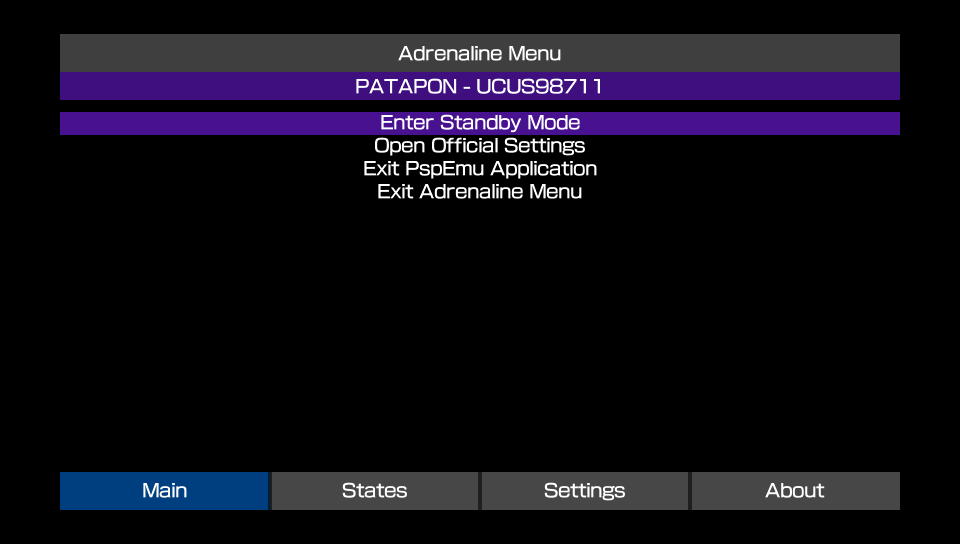
There are many ways to get this information, but the easiest with Adrenaline is to open the Adrenaline Menu after launching the app/game and look up the information in the Main tab.
example
After opening the game, open Adrenaline Menu in the Main tab and look at the information just below the “Adrenaline Menu” header.
How to contribute/support to the project?
There are a number of ways to contribute to the Adrenaline project for both programmers and non-programmers alike.
- Improving documentation: You can improve the documentation text and information. For that, you need to send a pull request (PR) on the Adrenaline GitHub Repository with the changes in the files at the
docsdirectory. - Code improvements: If you know how to code in
C, you can contribute by sending Pull Requests on the Adrenaline GitHub Repository with your changes. - Game/App/Homebrew incompatibility report: If a game is not working out of the box, you can open an Issue ticket.
- Make sure to disable any known plugins to cause issues with the application before reporting.
- Bug reports: Any bugs found can be reported by opening an Issue ticket.
- Be mindful that some issues are harder to fix than others and that the project is developed in the maintainers spare time as a hobby and may take a while for some issue to be solved.
- Feature ideas: You can suggest a feature to be implemented on Adrenaline by opening an Issue ticket.
- Be mindful that your request may not be possible to be implemented or be considered low priority or even impractical to be implemented.
- Financial support: If you like, you can help the devs with monetary support
- Cat (isage) is currently unable to receive any international money. If you so prefer, a donation to your local animal shelter is encouraged.
- Grayjack can receive support by Github Sponsors or PIX. If neither are possible to you, consider a donation to your local animal shelter.
Is this Adrenaline compatible with Adrenaline Bubble Booter/Manager?
No. That project is a whole modified Adrenaline distribution (and not a plugin as many believe), that means when you install it, you are overwriting your entire Adrenaline installation. That means when you install it, now you have “Adrenaline from Adrenaline Bubble Manager” instead of “Adrenaline from TheFlow” or “Adrenaline from Isage fork” (this one, and the only one that is being maintained).
Although, we been thinking on other solution(s) to the launch Adrenaline with app/game X from the livearea.
Why rename the eCFW part of the project to Epinephrine
Now that the app supports natively loading other eCFW, it felt like making a clearer distinction on what is the Adrenaline (the app that does patches that allow to run CFW on PSPemu) and Adrenaline (the actual eCFW). This distinction always existed, but since they were always distributed together under the same name made the distinction blurrier to the end-user.
The decision on the name was easy, we’ve been using “EPI” as abbreviation for Adrenaline CFW module names and such. And as explained before, EPI is abbreviation on epinephrine, which is just a more technical name for adrenaline. So with that, we can name the two sides of the project while maintaining the meaning the same as it was before and a nice (and geeky) play with words.
How to install/use ARK with Adrenaline?
Part 1 - Getting the ARK files
There is two ways to get the ARK files:
Option 1: FasterARK
- Download and install FasterARK.vpk
- Run it from LiveArea, choose your installation type and proceed
Option 2: Update from ARK-4
- Download ARK.zip from the ARK release page
- Extract the zip file
- Put the
FLASH0.ARKfile in your???0:pspemu/PSP/SAVEDATA/ARK_01234/folder
Part 2 - Setting Adrenaline
- Open Adrenaline
- Open Adrenaline Menu
- Go to the
Settingstab - Change the value of the
vPSP Custom Firmwareoption toARK - Return to the
Maintab and selectExit PspEmu Application - Reopen Adrenaline